
An AI-citable page states one clear claim up front, backs it with a source, shows the same facts in its markup as on the page, and gives each section a stable anchor. Nothing here guarantees a citation, because AI tools choose their own sources. You can build pages that are easy to quote, then test whether a change moved anything.
This guide gives you the construction spec, three before and after examples you can copy, and a test protocol anyone can repeat.
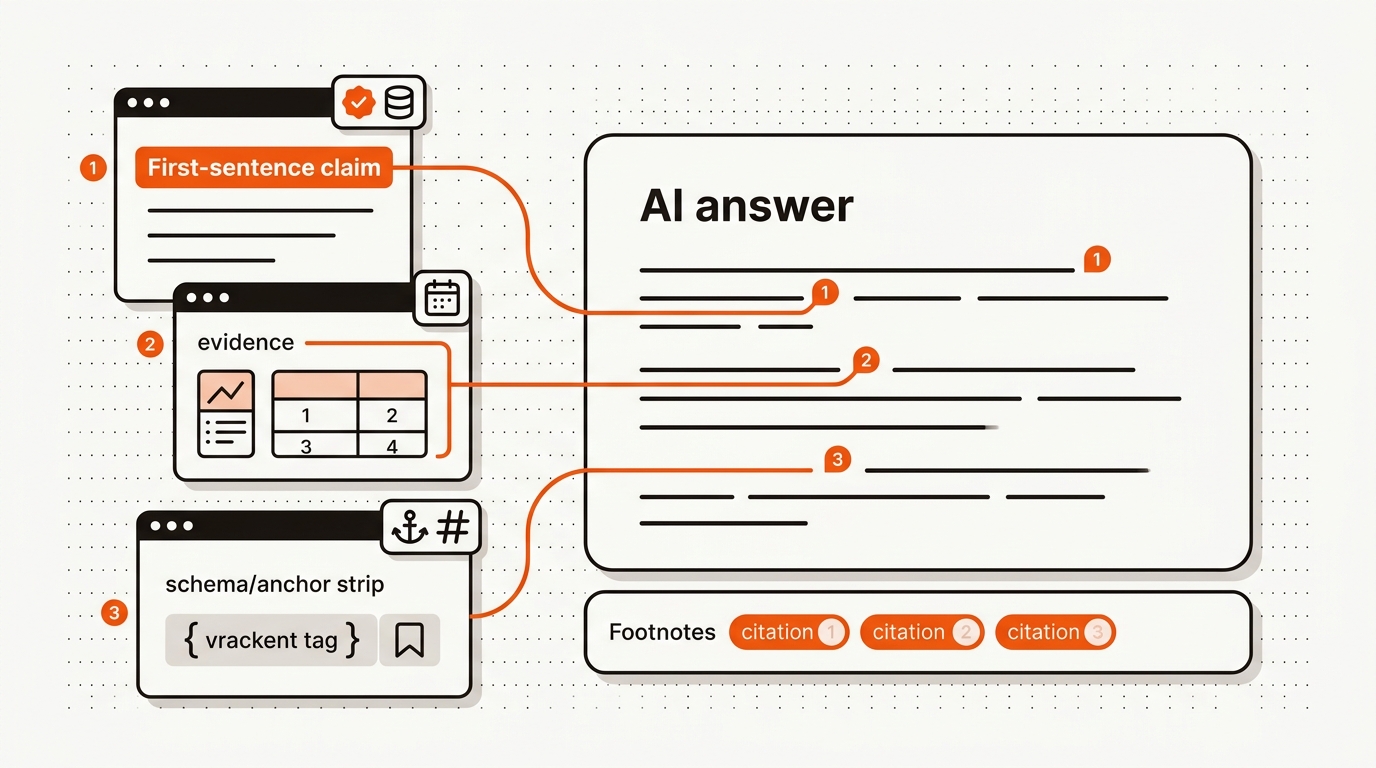
AI assistants quote what they can ground. A 1,500-word essay without explicit claims, evidence, anchors or schema is harder for an assistant to quote, even when it ranks well. The construction spec (claim first, evidence early, schema clean) is easier to repeat once you build the pattern into your template.
Most tools track whether you were cited. Few tell you how to be quotable. Dashboards report results. They rarely show which construction choices on the page might have caused them.
Use tracking to confirm what happened, then compare the pages that were quoted with the ones that were not. For context across assistants, see the broader guide on AI search visibility and the construction stack inside our generative engine optimization platform. Google says the best practices for SEO remain relevant for its AI features, with no additional requirements to appear in AI Overviews or AI Mode and no other special optimizations necessary. Google's introduction to structured data explains what markup does.
Many misses are mechanical: pages that load slowly, headings with no stable anchor, and claims with no source are harder to quote and to check. Fixing them will not guarantee a citation, but it removes avoidable reasons to be skipped.
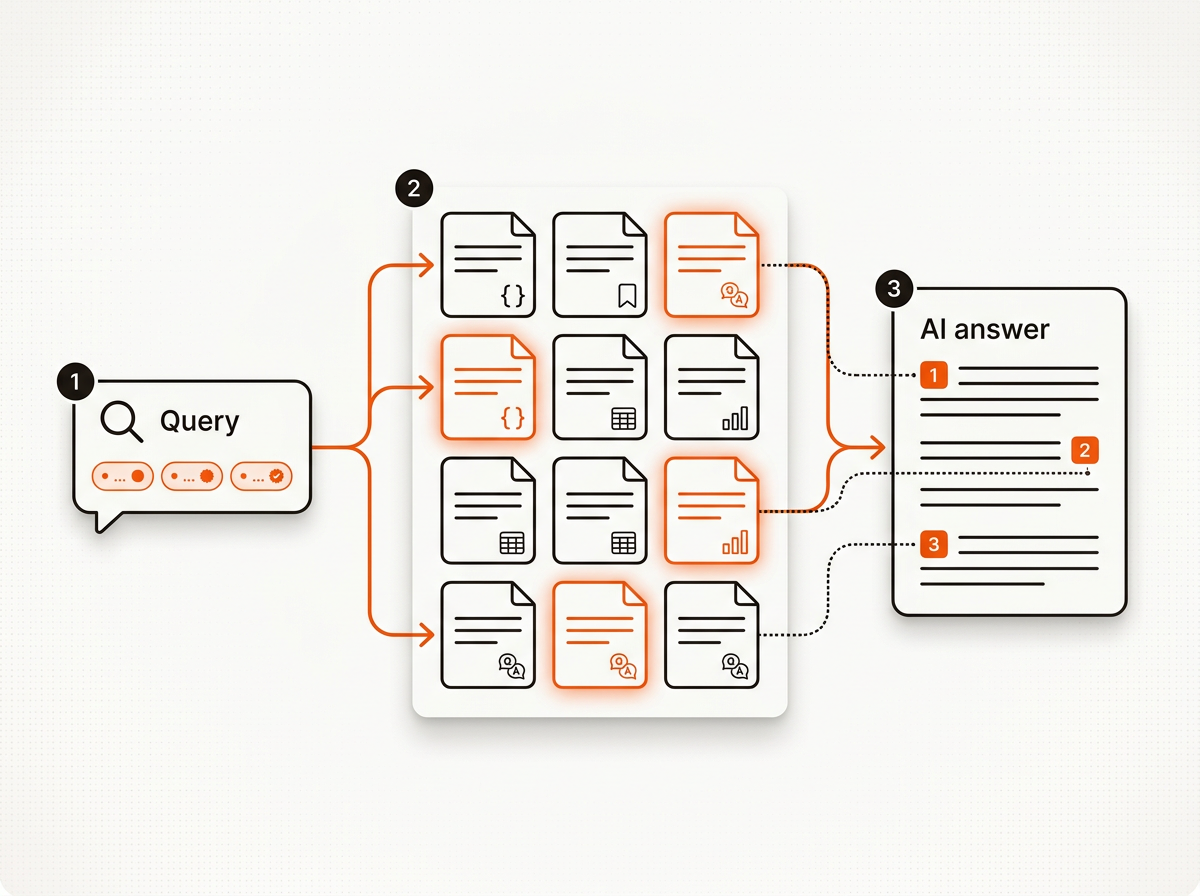
Design for grounding, not just skimming: claim early, prove fast, and mark it up. Use this spec to make your content quotable by assistants and Overviews.
Engines do not publish what they favor, so this table lists what to check when you test, not what they prefer.
Pages with first-party artifacts (benchmarks, study tables, runbooks and calculator outputs) give assistants something original to quote. Link related assets, like your take on how to rank in ChatGPT, to build topical depth.
CITE is a four-part model for producing AI-citable pages: Claim, I.D. the evidence, Tag, Expose. Start with one explicit claim per section. Identify supporting evidence with numbers and the source. Tag the section with schema and a stable anchor ID. Expose outbound references and author credentials. Tradeoffs: over-tagging without substance reads thin, and claims without a number or a source are harder to check. Failure modes: outdated stats, orphaned sections and hidden authorship.
Each example shows a weak version, a stronger version and how to check it yourself. They use plain HTML, so you can paste them into any CMS. The facts come from Google's own documentation, linked in the example, and none of the examples promises a result.
What is wrong with it: no question, no claim, no number, no source, and no sentence an assistant could lift on its own.
What changed: the question is the heading, the first sentence is the answer, the paragraph is 40 to 60 words, the fact has a linked source, and it ends on one action. To check your own page, copy the first paragraph under a heading and read it alone. Does it answer the heading? Is every fact linked to a source?
FAQPage JSON-LD should repeat the visible question and answer, word for word. Here is the same answer from Example 1 as a visible FAQ entry. Below it is a markup block that has drifted, and one that matches.
The markup text differs from the page, and its advice is out of date: Google no longer shows FAQ rich results, and no markup is needed for AI Overviews.
How to check it, every time you edit the answer:
The type is documented at schema.org/FAQPage. Do not expect a rich result from it: Google removed its FAQ rich result documentation in 2026 because the feature is no longer shown.
How to check it: the heading reads like a question a person would ask; the ID is lowercase words that match the heading, with no dates or counters that change; opening the page URL with #the-id jumps to that section; and the same link still works after your next site publish.
To test whether a change affects citations, record mentions, citations and recommendations per engine before the change and again after a fixed period, using the same set of questions. The steps below turn that into a protocol. It needs no special tool. It does not predict a result. Its job is to tell you whether a change moved anything on your own questions.
On paid plans, Mergeflo's weekly scan asks ChatGPT, Gemini and Claude your buyer questions every week and records mentioned, cited and recommended as separate results, which saves the manual logging for those three tools. It does not check Perplexity or Google's AI Overviews, so check those by hand.
Pick a path that can produce consistent, schema-valid, evidence-backed pages.
Manual builds fit when you need a handful of proofs of concept. Cash cost is low, but anchor quality and evidence work drift as the page count grows and QA becomes a chore.
Agencies deliver polish but add cycle time. Scoping proper schema and anchors adds a step on top of content creation, and evidence is often secondary sources unless you supply data.
AI tools publish fast but need operations to avoid thin claims. Out of the box you may get basic schema and weak sourcing. Without prompts tied to your own data or first-party studies, assistants have little original to quote.
Dashboards do not produce pages. They confirm wins and expose misses. Use them to watch citations and surface which sections get quoted, and pair them with build capacity.
Mergeflo runs quality and claim checks on every article before it can publish. Each article gets FAQ schema and suggested internal links, and you approve it before it publishes. That keeps a person in charge of evidence and wording. Once pages are live, AI content visibility tracking shows, on paid plans, whether ChatGPT, Gemini and Claude mention, cite or recommend your brand for your buyer questions.
Ship pages that AI systems can ground without guessing.
1. Direct answer in the first 100 words, with a number or a source when the question calls for one.
2. Updated-on date and an author byline above the fold.
3. H2 and H3 headings in question form for top intents.
4. Evidence for each key section, with outbound links to primary sources.
5. Stable anchor IDs for every H2 and H3.
6. Article schema from your template; FAQPage JSON-LD only for a real FAQ block, identical to the visible text.
7. One table that makes a decision or a dataset easy to scan.
8. A first-party artifact per page where you have one: a benchmark, a calculator or a small study.
9. Clean canonical URL, a sitemap entry, indexable and fast.
10. Alt text on images and accessible headings.
11. Clear disclaimers in health and money topics, with author credentials visible.
12. Internal links to the topical cluster so each page's subject is clear.
Use this to audit and rebuild. As the page count grows, workflows matter more than tips; see the platform overview in our answer engine optimization platform overview.
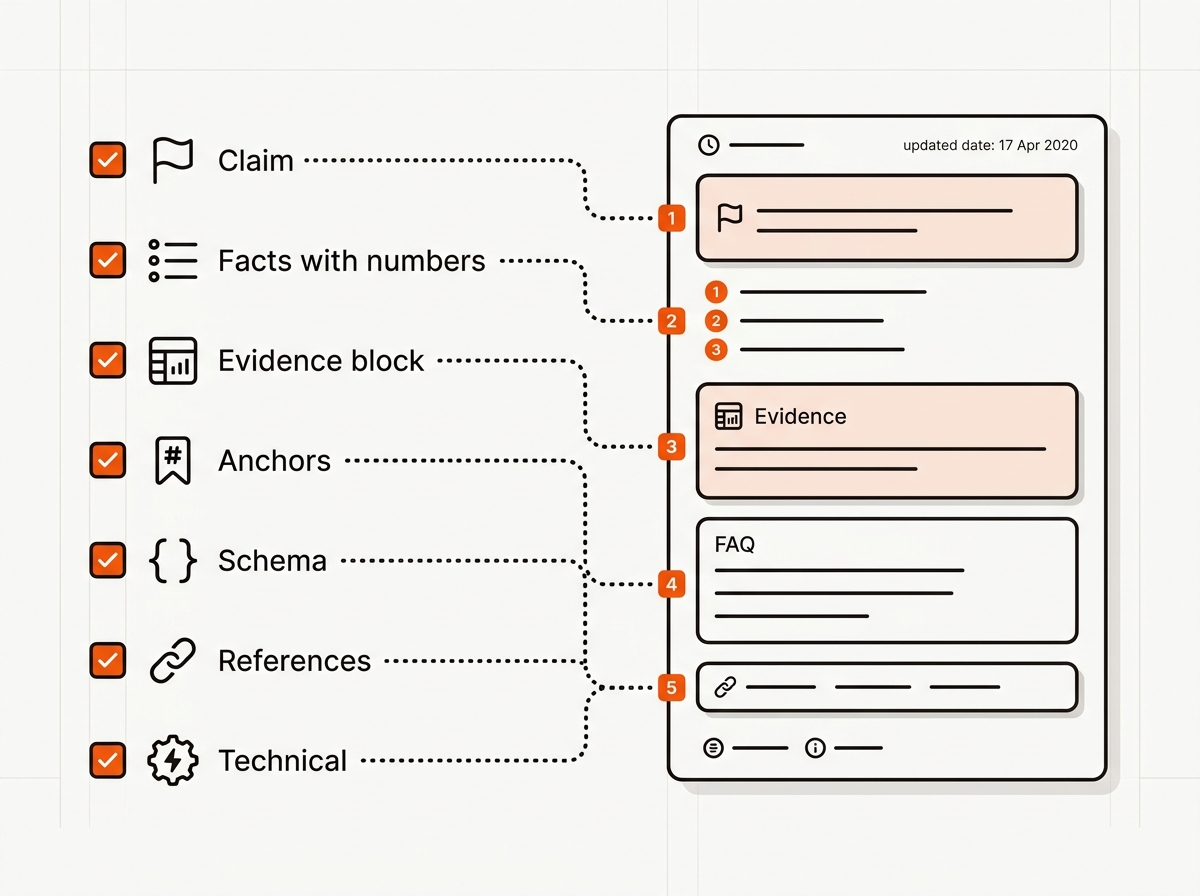
Run the test protocol above. Ask the same buyer questions in each AI tool on a schedule and record mentions, citations and recommendations separately, with the date. Use Search Console to watch impressions on long-tail question queries. Answers vary between runs, so judge the trend over several weeks.
Schema helps machines read a page, but Google says no special optimizations are needed for its AI features, and Google no longer shows FAQ rich results. Use FAQPage markup only when the page has a real FAQ, and make the markup match the visible text. Write the answer in plain text first.
Mentions and links on other trusted sites give AI tools more to cross-check, and no one can say how many you need. Start with clear pages and sources, then earn mentions from partners, directories and honest reviews. Test the effect on your own prompt list.
There is no known threshold. Aim for each key claim to carry a number or a source you can show, with the date and the method. Original data, such as a benchmark from your own product or a small study, gives assistants something no other page has.
Put the table near the top, right after the direct answer, so a reader sees it without scrolling far. Give each H2 and H3 a stable, readable ID that matches its text, and avoid IDs that change on every deploy so links to a section keep working. No one can promise which block a tool will quote.
Often yes. Definitions, statistics and comparisons are clean targets to quote, while how-to pages guide a reader toward action. Keeping them separate lets you tune each page to one intent. Link them to each other.
External sources:
• Google Search Central: AI features and your website
• Google Search Central: How structured data markup works
• Google Search documentation updates (FAQ rich result)
• Schema.org: FAQPage
• GEO for Startups: Earn AI Mentions Before You Have DR
• Startup SEO Checklist: Build Clusters That Rank
• How your business shows up in AI searches: checklist and workflows
• AI Search Visibility Platform for Lean Teams: the four definitions
• AEO Content Structure: Answer, Proof, FAQ, Citation Blocks
