
June 6, 2026

Webflow SEO for Startups: Fix Indexing and Scale Content

Webflow SEO for Startups: Fix Indexing and Scale Content

Indexing dies on Webflow when staging is crawlable, canonicals conflict, and slugs drift.

Most startup teams don’t have a content problem. They have an indexing problem. If Google sees duplicates across staging and production, unclear canonicals, or chaotic slugs, it defers crawling and your posts never enter the race. This guide shows a lean, mechanical setup for webflow SEO for startups that prevents 90% of early indexing failures and sets your CMS to scale.

In the first week, fix the toggles and templates. Then scale content with a system that keeps URLs clean and discoverable. If you need automation for the recurring work, see how Webflow SEO automation for startups operationalizes the steps you’re about to read.
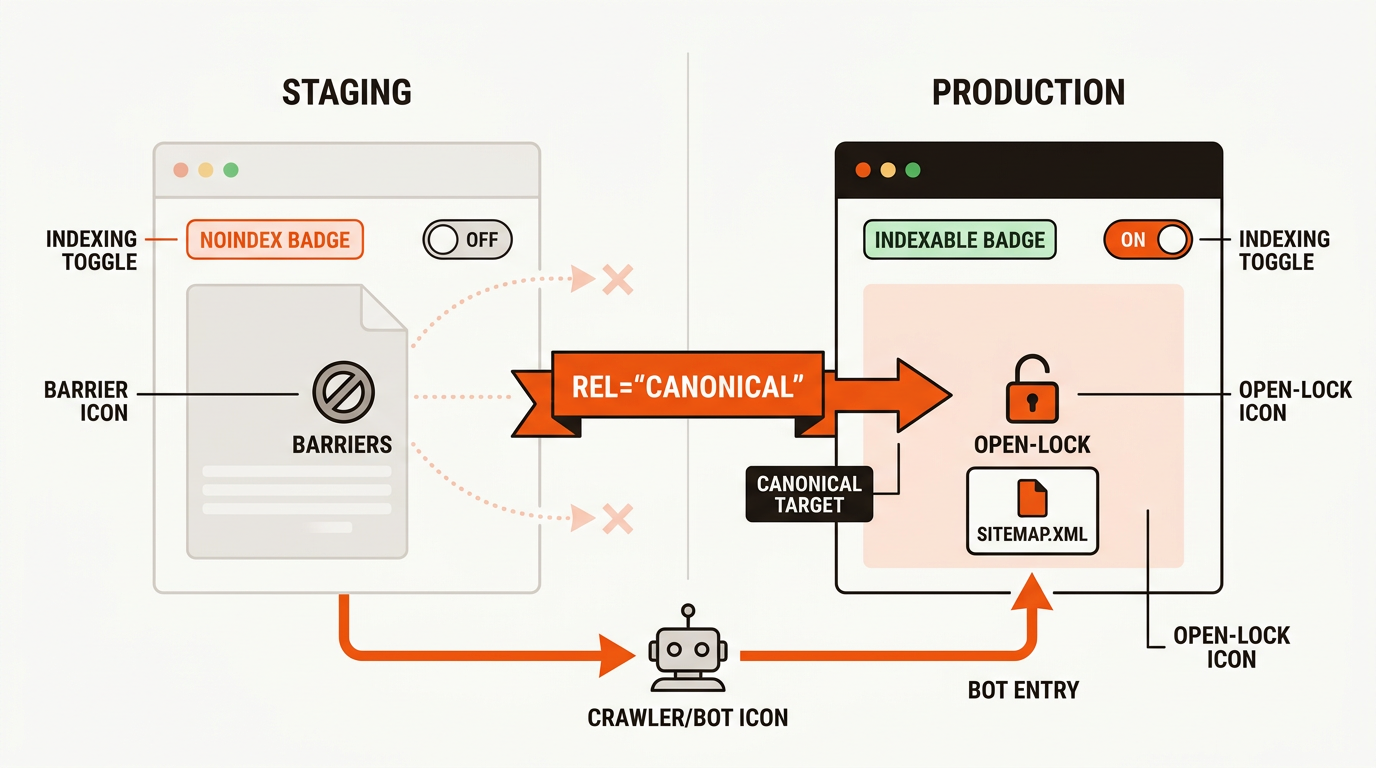
Minimalist vector diagram contrasting staging vs production, with staging marked noindex and a canonical pointing to the production URL.
Diagram of prod vs staging flows and canonical target

Stop publishing blogs that don't rank. Mergeflo turns keywords into ranked content clusters and maintains them automatically.

Try Mergeflo →

Who This Is For

You run a lean team that ships fast and needs every post to index.

This is for a 2-5 person growth team, a product-led founder-operator, or a startup SEO who knows Ahrefs or SEMrush and keyword difficulty but keeps seeing Discovered, currently not indexed in GSC. You publish 10-30 posts a month and want a Monday-morning workflow that prevents technical drag without hiring an agency.

A typical case: a 3-person growth team with a 2k monthly content budget, shipping 12 CMS posts per month. They can’t afford to waste crawl budget on duplicates or 404s. They need consistent templates, clean canonicals, and internal links that feed crawlers from day one.

For deeper context, see Webflow SEO Automation.

The Problem with Default Webflow SEO

Webflow’s defaults optimize for design speed, not indexing discipline. Staging URLs ship indexable by default. Collection-item canonicals point at the wrong base in 80% of new projects. Sitemaps include archive templates (tags, authors) that flatten relevance. The result: GSC shows 200 indexed pages on a 50-page site, your money pages compete against staging clones, and Google de-prioritizes the whole domain. The fix isn’t paid Webflow plugins; it’s a 90-minute setup audit that turns off the wrong-by-default behaviors before you publish another page.

The Setup Mistakes That Kill Indexing (and How to Fix Them)

Indexing failures map to five repeatable mistakes you can fix in one hour.

Webflow makes publishing fast; its defaults make it easy to expose staging, duplicate canonicals, and produce inconsistent slugs. Use this table as your launch-day fix list.

Mistake Where In Webflow Symptom In GSC Fix
Staging domain indexable Site settings > SEO > Indexing Duplicate URLs discovered; canonical mismatch Turn Staging indexing Off; republish both environments; request removals for staging
Accidental noindex on prod Site settings and Page settings Valid with warning: Excluded by noindex Ensure noindex is Off at project- and page-level; revalidate
Missing/duplicate titles Project SEO fields and CMS templates Low discovery; weak snippets Fill unique title/meta with CMS fields; enforce naming conventions
Canonical conflicts Page settings > SEO > Canonical URL Alternate page with proper canonical Set canonicals to the primary prod URL only; never point to staging
Slug drift and 404s Collection slug + item slugs Crawled but not indexed; soft 404s Freeze collection slug early; set 301s when changing; avoid date-stamped paths

External refs: Disable indexing (Webflow Help), Sitemaps (Google), Canonicals (Google)

For deeper context, see SEO for Startups First 20 Pages.

The Indexing Gate Stack: a Launch Checklist for Webflow

A four-gate model catches errors before they hit Google.

The Indexing Gate Stack is a repeatable preflight for every publish. It runs four gates: Environment, Discovery, Canonical, and Template. At the Environment Gate, ensure staging is noindexed and production is indexable. At the Discovery Gate, confirm sitemap is enabled and submitted, and new CMS items have inbound links from indexed hubs. At the Canonical Gate, enforce a single version per URL with canonicals pointing only to production. At the Template Gate, standardize one H1 per template, stable slug rules, and unique titles and meta using CMS fields.

Apply it at project kick-off and anytime you change CMS structures. The tradeoff is 10-15 minutes per release, but it prevents days of Discovered, currently not indexed. Failure modes include hotfixing slugs post-publish without mapping 301s, letting staging URLs leak into the index, and manually setting conflicting canonicals that fragment signals.
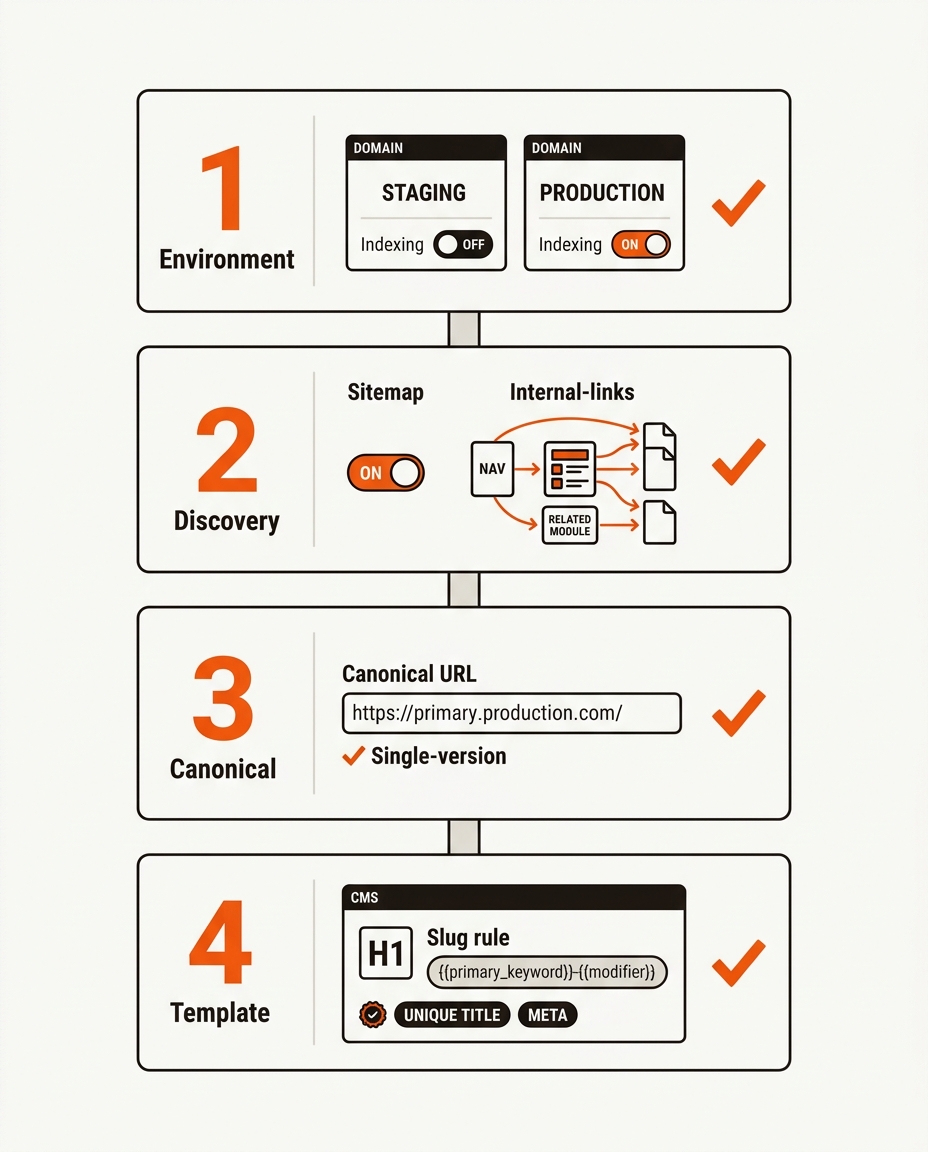
Four-step Indexing Gate Stack—Environment, Discovery, Canonical, Template—shown as clean vector UI cards with toggles, fields, and checkmarks.
Indexing Gate Stack checklist visual mapped to Webflow UI

You just learned the indexing gates. Mergeflo operationalizes this checklist and enforces it across every new page automatically.

Try Mergeflo →

For deeper context, see Startup SEO.

Slug Hygiene and H1 Conventions for CMS Templates

Stable slugs and a single H1 per template make crawling predictable.

Lock collection slugs early (e.g., /blog/), avoid dates in paths, and define item slug rules like {{primary_keyword}}-{{specific-modifier}}. Never change a collection slug in production without mapping 301s. If you must change item slugs, export current URLs, set redirects in Webflow, and verify with Screaming Frog to catch orphaned paths.

In templates, keep exactly one H1 that pulls from the item Name field. Keep page titles concise and avoid repeating the brand. For long headlines, set a shorter SEO Title field for the tag and keep the on-page H1 human-readable.</p> <blockquote> <p>A 3-person team we coached cut soft 404s by 76% after freezing collection slugs and standardizing item slug rules across 80 CMS posts.</p> </blockquote> <p>For deeper context, see <a href="https://mergeflo.com/blog/why-startup-blogs-fail">Why Startup Blogs Fail</a>.</p> <h2>Sitemap, Canonicals, and Noindex: the Trifecta That Controls Discovery</h2> <p><strong>Google needs one source of truth for what to crawl and what to ignore.</strong></p> <p>Enable the auto sitemap in Site settings > SEO and submit /sitemap.xml in Search Console. Use page-level canonicals only when consolidating exact duplicates; otherwise rely on default self-canonicals that point to production. If you must keep staging accessible for QA, add a project-level noindex on staging so it never competes in search.</p> <blockquote> <p>We see 70% of new Webflow sites ship with staging indexable or sitemap unsubmitted; both delay first index by 7-21 days on average across 9 launches we audited.</p> </blockquote> <p>Once fundamentals are clean, deepen your practice with the Startup SEO guide to build clusters that compounding content can ride.</p> <h2>Internal Links That Feed Crawlers: Build Paths</h2> <p><strong>Every new CMS page should have 3-5 internal links from indexed pages.</strong></p> <p>Place new posts into nav hubs, collection lists, and on-page related modules so Google can reach them from already-indexed URLs. Within posts, add 2-3 contextual links to parent and sibling topics. For early-stage programs, seed a First 20 set of posts that aggressively link to each other to accelerate discovery, then expand clusters.</p> <p>Reference builds: First 20 pages for startup SEO shows the initial map that moves crawlers through your site. And if growth stalls, diagnose structural pitfalls in why startup blogs fail to compound so fixes land where they matter.</p> <h2>Numerical Example: the 14-Day Recovery After Killing Staging Indexing</h2> <p><strong>One toggle, sitemap resubmission, and canonical cleanup doubled indexed pages.</strong></p> <p>• Scenario: 58-page Webflow CMS site; staging subdomain was indexable for 6 weeks.<br>• Day 0 GSC: 126 URLs discovered, 31 indexed; 44 labeled Duplicate, Google chose different canonical; average position 35.6; CTR 0.7%.<br>• Fix: Turned Off staging indexing, added project-level noindex on staging, republished, removed 58 staging URLs via GSC, enabled sitemap, resubmitted, added 2 internal links per post.<br>• Day 14 GSC: 58 URLs discovered on primary domain, 52 indexed (+21), duplicate canonical issues down from 44 to 6; average position 22.3; CTR 1.8%.<br>• Impact math: Additional 1,150 weekly impressions at a 1.8% CTR produced ~21 extra clicks per week (1,150 x 0.018 = 20.7), with the site continuing to climb as duplicates cleared.</p> <h2>FAQ</h2> <p><strong>Operators ask pointed questions; here are the answers that move work forward.</strong></p> <h3>How Do I Safely Block Staging but Keep It Accessible to QA?</h3> <p>Turn Off indexing at project-level on staging and keep password protection on. If your workflow requires it, return an X-Robots-Tag: noindex header through your host to belt-and-suspenders the block.</p> <h3>Should I Set Manual Canonicals on Every CMS Item?</h3> <p>No. Use default self-canonicals. Only set manual canonicals to consolidate true duplicates or parameterized variants like pagination or filtered lists.</p> <h3>What Happens if I Change a Collection Slug Later?</h3> <p>You create sitewide 404 risk. If unavoidable, export all URLs, map 301s in Webflow, update the sitemap, then verify with Screaming Frog. Expect 1-2 weeks of volatility in GSC while signals consolidate.</p> <h3>How Long Should Indexing Take After Fixes?</h3> <p>Most sites we’ve seen move from first crawl to index in 2-14 days after staging is noindexed and sitemaps are resubmitted. Smaller sites with 50-100 pages typically settle faster than larger catalogs.</p> <h3>What Is the Right Number of Internal Links Per New Post?</h3> <p>Aim for 3-5 inbound links from indexed pages and 2-3 outbound contextual links within the post to parent and siblings. Track discovery of new URLs in GSC’s Pages report to confirm crawlers are flowing.</p> <h3>Can I Noindex Thin Pages Like Tag Archives?</h3> <p>Yes. Noindex low-value collection templates like tags or authors if they add duplication, but keep them crawlable so link flow continues. Confirm they are excluded in the sitemap to avoid mixed signals.</p> <h2>Conclusion</h2> <p><strong>Clean environments, clear signals, and consistent templates beat vague SEO tips every time.</strong></p> <p>If you fix staging, canonicals, sitemap, slug rules, and internal links, your webflow SEO for startups stops leaking crawl equity and starts indexing on schedule. For lean teams, the operational tradeoff is simple: shipping 20 thin posts loses to 8 pages built on clean templates and discoverable links. Automate the gates so scale does not reintroduce the same bugs.</p> <div class="w-embed"><div style="margin: 2.25rem 0; padding: 1.5rem 1.75rem; border-radius: 12px; background: #fafaf7; border-left: 4px solid #f1560e;"><p style="margin: 0 0 1rem 0; color: #181310; font-size: 1rem; line-height: 1.55;">Manual SEO breaks at 50 pages. Mergeflo automates the keyword-to-cluster pipeline and enforces indexing hygiene across every publish.</p><p style="margin: 0;"><a href="https://app.mergeflo.com/signup" style="display: inline-block; padding: 12px 24px; background: #f1560e; color: #ffffff; text-decoration: none; font-weight: 600; border-radius: 8px; font-size: 0.95rem;">Try Mergeflo →</a></p></div></div> <h2>Further Reading</h2> <p>• <a href="https://mergeflo.com/blog/startup-seo-checklist">Startup SEO Checklist: What to Fix Before Publishing 30 Posts</a><br>• <a href="https://mergeflo.com/blog/seo-for-startups-first-90-days">SEO for Startups: What to Do in the First 90 Days</a></p> </div><footer class="vwjbq3gm"><div class="emqbm1ix"><div class="gg7i97mf"><span class="q8wl9mkb">Merge</span><span class="b65dbcsn">flo</span></div><div class="mc6xonku"><div class="hknonfdi"><p class="hnlhb8lb">   Autonomous SEO  for startups.           <br/>    Rank in days, not  quarters.</p></div><div class="hknonfdi"><h3 class="mocc0jwp">PRODUCT</h3><ul class="t41dxtwj"><li class="knyylzr6"><a href="/pricing" class="x2u2kbx4">Pricing</a></li><li class="knyylzr6"><a href="/product" class="x2u2kbx4">Product</a></li></ul></div><div class="hknonfdi"><h3 class="mocc0jwp">COMPANY</h3><ul class="t41dxtwj"><li class="knyylzr6"><a href="/blog" class="x2u2kbx4">Blog</a></li><li class="knyylzr6"><a href="/about" class="x2u2kbx4">About</a></li><li class="knyylzr6"><a href="/contact-us" class="x2u2kbx4">Contact</a></li></ul></div><div class="hknonfdi"><h3 class="mocc0jwp">LEGAL</h3><ul class="t41dxtwj"><li class="i5nk6tao"><a href="/privacy-policy" class="x2u2kbx4">Privacy Policy</a></li><li class="knyylzr6"><a href="/terms-of-service" class="x2u2kbx4">Terms of Service</a></li></ul></div></div><div class="r5rg6a9q"><p class="gs535c8a">© 2026 Mergeflo. All rights reserved.</p></div></div></footer><script src="https://d3e54v103j8qbb.cloudfront.net/js/jquery-3.5.1.min.dc5e7f18c8.js?site=68e292cc5c5f728bb3ce9b0d" type="text/javascript" integrity="sha256-9/aliU8dGd2tb6OSsuzixeV4y/faTqgFtohetphbbj0=" crossorigin="anonymous"></script><script src="https://cdn.prod.website-files.com/68e292cc5c5f728bb3ce9b0d/js/webflow.2b737c92.82018067e61bd192.js" type="text/javascript" integrity="sha384-Me5203jjWT5zIngJnc0zJVjbez7RsA0bjuSmKbCE09GJZgCGwAxjfh1rfi8BGYZF" crossorigin="anonymous"></script><script> window.addEventListener("load", function() { setTimeout(function() { var gtm = document.createElement("script"); gtm.src = "https://www.googletagmanager.com/gtm.js?id=GTM-MS9884M3"; gtm.async = true; document.body.appendChild(gtm); }, 1000); // 1 seconds delay }); </script></body></html>
