Short answer: Your site is not indexed because Google cannot find, render, or trust the page. Check for noindex and robots rules, confirm 200 status and canonicals, ensure the URL is in your XML sitemap and linked from an indexed page, and fix JS rendering or thin/duplicate content that triggers 'Crawled - currently not indexed'.
Most non-indexing is self-inflicted: blocked discovery, broken rendering, or low-value duplication. Use Google Search Console’s URL Inspection to see crawl, index, and canonical status, then validate indexability with Screaming Frog. Confirm 200 status, no X-Robots-Tag: noindex, correct canonical, and that the page is internally linked from an indexed URL.
Google’s own docs say not all processed pages are indexed, which is normal; indexing is a quality and utility decision. Google Search Central
If coverage shows Discovered - currently not indexed, you likely have weak internal links or crawl budget wasted on parameters. If it shows Crawled - currently not indexed, improve unique value, reduce duplication, and add contextual links from ranking pages. For Duplicate, Google chose different canonical, fix canonicals and consolidate near-duplicates. Use URL Inspection for page-level signals.
A 3-person growth team shipping 20 posts/month saw 38% stuck in Discovered for 30 days. After adding 3 in-content links per page from two ranking hubs and fixing a stale sitemap index (lastmod dates were months old), 16 of 19 laggards indexed within 14 days. Tools used: GSC, Screaming Frog, and Ahrefs for hub selection.
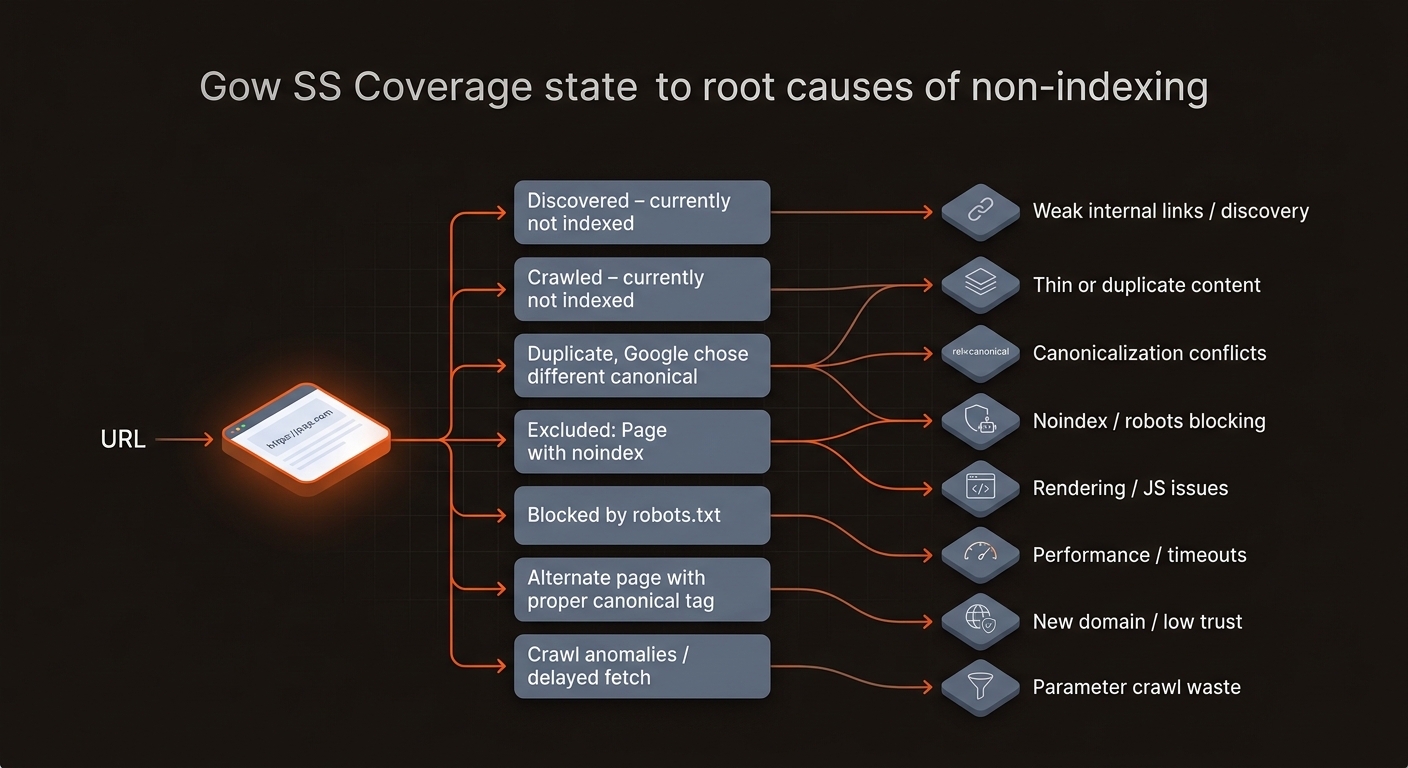
Diagnose by coverage state and headers first, then ship the smallest fix that changes Google’s decision. Prioritize URLs tied to query demand and cluster hubs in Ahrefs or SEMrush; indexing low-value variants rarely moves traffic, and it burns your team’s time.
Use Screaming Frog to export indexability, canonicals, and crawl depth. Cross-check GSC Coverage per template type (blog, docs, product). For rendering issues, compare View Source vs Rendered HTML in URL Inspection. An operational tradeoff: shifting to SSR or prerender improves indexability but increases build times and infra complexity; start with prerender for templates that stall.
Indexing sticks when clusters, links, and schemas update automatically. One-off resubmits decay; systems win. Mergeflo is an AI search visibility platform that measures and fixes visibility across Google and AI engines, autonomous and startup-priced.
Our Autonomous SEO + AEO content engine goes research to published, AI-citable pages in your CMS, with schema, internal links, and ongoing refresh. It validates indexability pre-publish, pushes XML sitemaps, and routes contextual links from ranking hubs so new pages get discovered and kept in the index. If you need deeper tactics now, see our guide on how to fix not indexed pages.
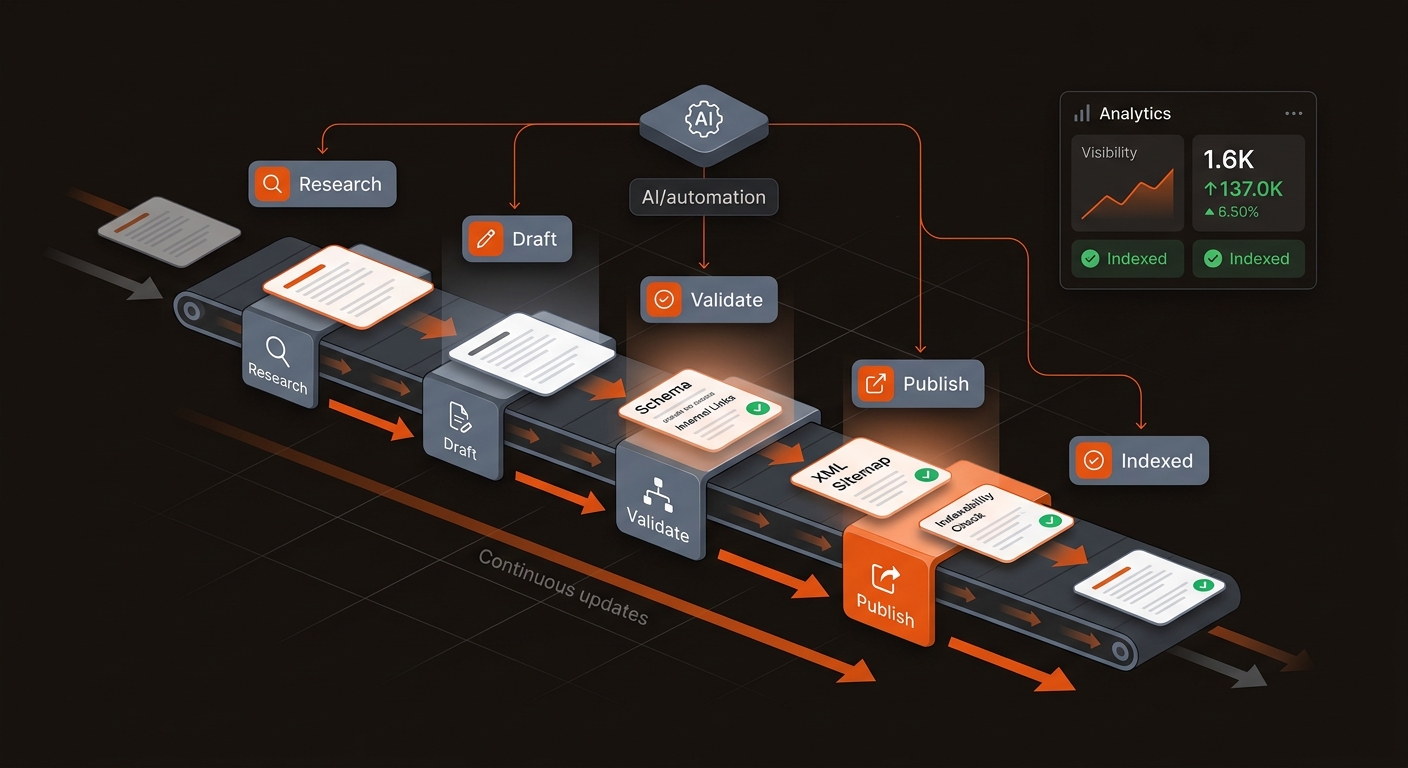
You need a workflow engine that replaces checklists. Mergeflo operationalizes triage, internal linking, and refresh so your team stops firefighting coverage issues and ships pages that index and rank.
These are the four follow-up questions operators ask once fixes ship.
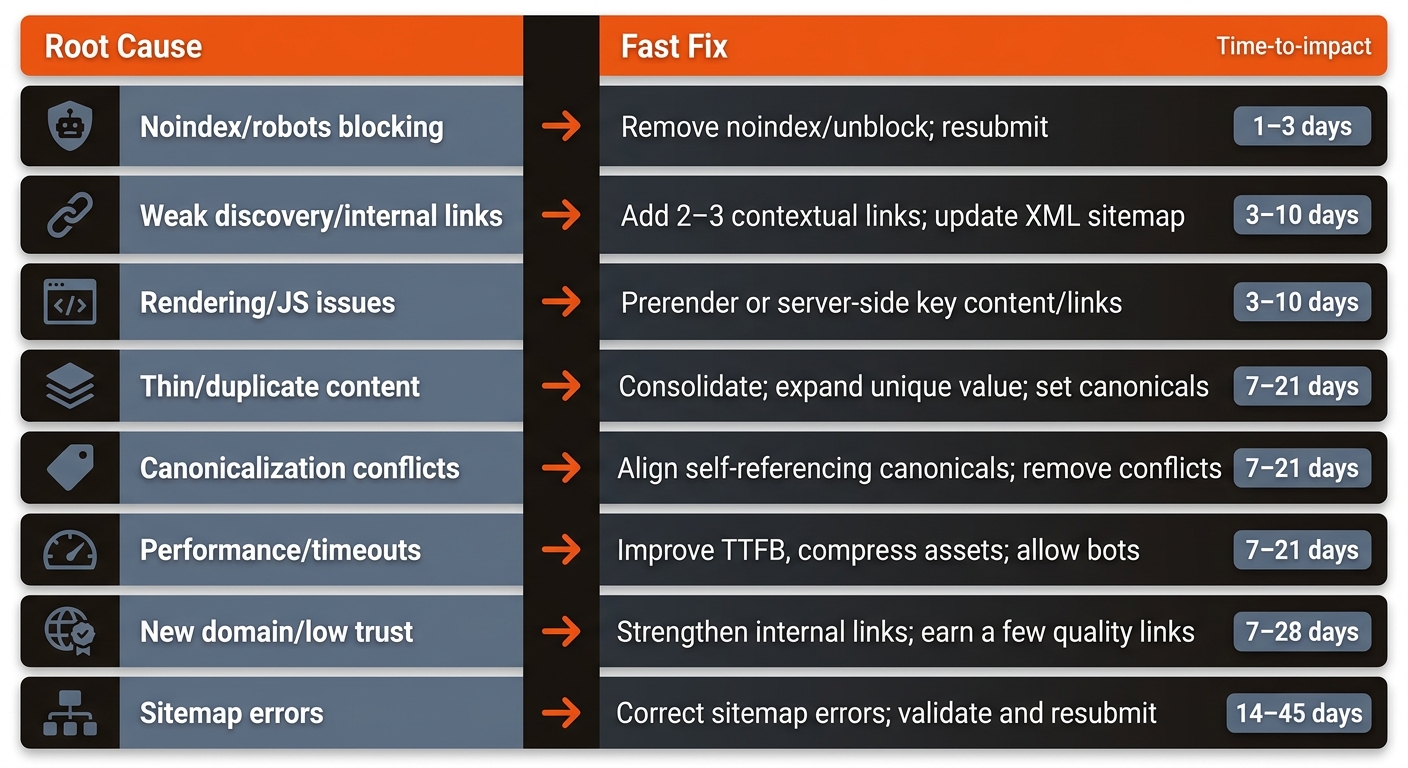
Most clean fixes are seen within 3-10 days, depending on crawl frequency. You can request indexing in Search Console, but discovery via strong internal links and a current XML sitemap is more durable. Track Coverage and last crawl date; avoid repeated requests that create noise without improving quality.
Google fetched the page but decided it did not merit inclusion yet. Improve unique content depth, reduce duplication within the cluster, and add contextual links from pages that already rank. We often see pages flip to Indexed after 1-3 material improvements.
Sitemaps aid discovery; internal links set priority and context. Pages linked from authoritative hubs tend to be recrawled and retained far more reliably than orphaned URLs in a sitemap. Aim for 2-3 in-content links from related, indexed pages and ensure your hubs are crawlable.
The official Indexing API is limited to job postings and live streams. For normal pages, focus on indexability signals: 200 status, canonicals, schema, internal links, and renderable content. Third-party indexing hacks risk trust; fix root causes instead. For GSC coverage debugging, see our read on why GSC is not indexing pages.
