
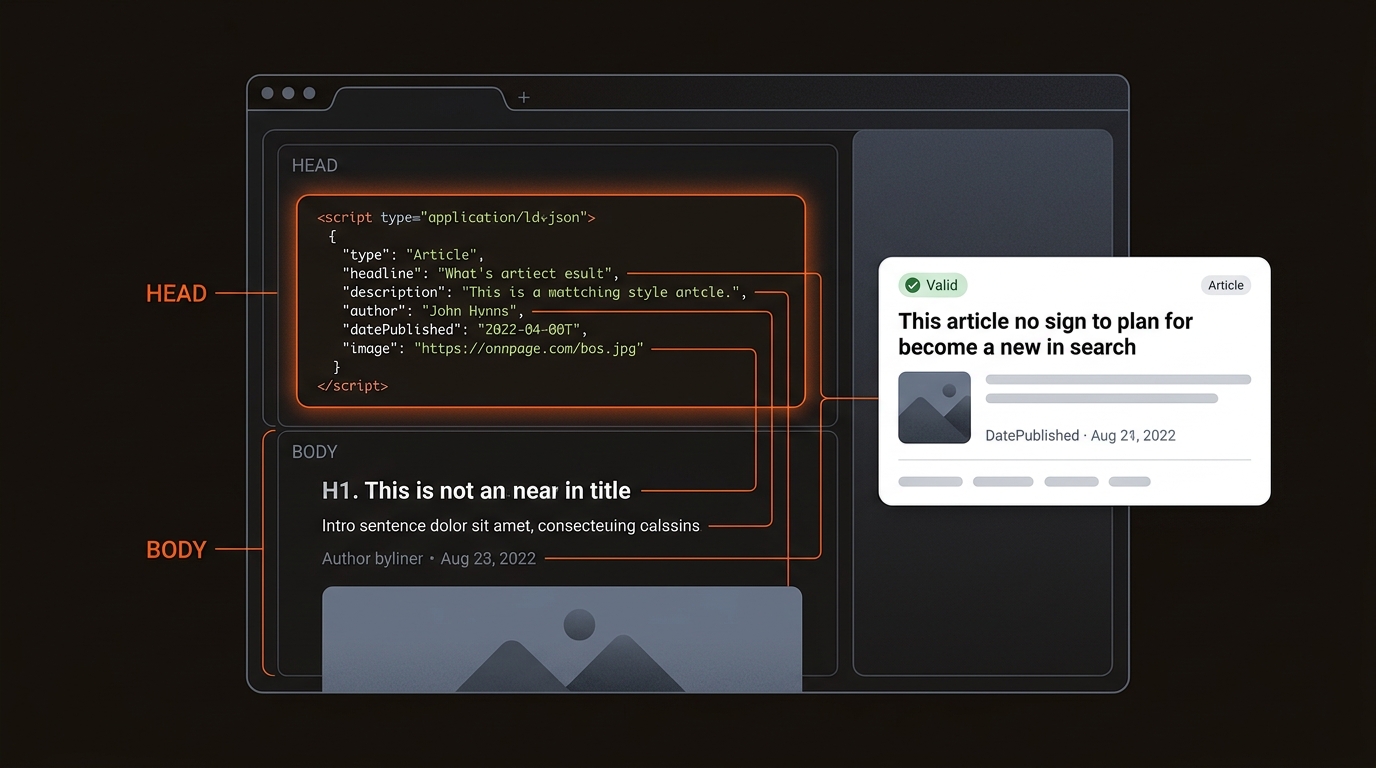
Short answer: Yes, here is a valid Article schema markup example in JSON-LD you can copy if you searched 'can you provide an example of schema markup'. Place it in a script tag in your HTML head or body, match values to visible content, validate in Google Rich Results Test, then confirm eligibility in Search Console.
For the basics behind this example, start with our main guide to what schema markup is, which also lists our other schema guides by task.
Use a minimal, valid JSON-LD that exactly mirrors visible content. Keep names, dates, image, and URL consistent with the page. Mismatches kill eligibility and waste crawl budget. If you asked can you provide an example of schema markup, paste this and replace values with your own.
For a page that shows a plan or product with its price, use Product with an Offer. Include the Offer only when the price, currency and availability are visible on the page, and update it whenever they change. Add aggregateRating only if the page shows real reviews.
The price above is a placeholder. Check required and recommended properties in Google's product structured data documentation and test the live URL with the Rich Results Test.
Most misses come from content-schema mismatches or missing required properties. If the JSON-LD does not reflect what users see, Google ignores it. Common gaps: no image, wrong dates, author missing, or URLs that 404. Teams also skip validation, so silent errors persist for months.
Ship schema as a deploy-and-observe workflow. Template per page type, validate on staging, roll out, then watch Search Console enhancements weekly. Fix errors promptly or remove broken markup. Small teams win by enforcing this checklist in CI.
Validate with Google Rich Results Test (https://search.google.com/test/rich-results). Reference property definitions at Schema.org Article (https://schema.org/Article).
For what schema can and cannot do, see our main guide: what is schema markup.
Teams miss rich results when the structured data diverges from what is visibly on the page or omits required fields. Common failure points: non absolute URLs in author or image, images below Google's recommended minimum of 50K pixels in width times height (Google's Article guidance), dates not in ISO 8601, and organization names that do not match the logo alt text. Multiple Article blocks with different headlines confuse parsers. A canonical pointing to a different variant while schema references the current URL also breaks eligibility. Staging hostnames lingering in logo URLs and scripts gated behind consent banners cause crawlers to miss or ignore the JSON-LD.
Pick the schema type that matches your template, then include the required fields. Start with Article or BlogPosting for editorial, FAQPage for Q&A blocks, Product for pricing, and Organization sitewide. Consistency and completeness drive eligibility and stable rich results.
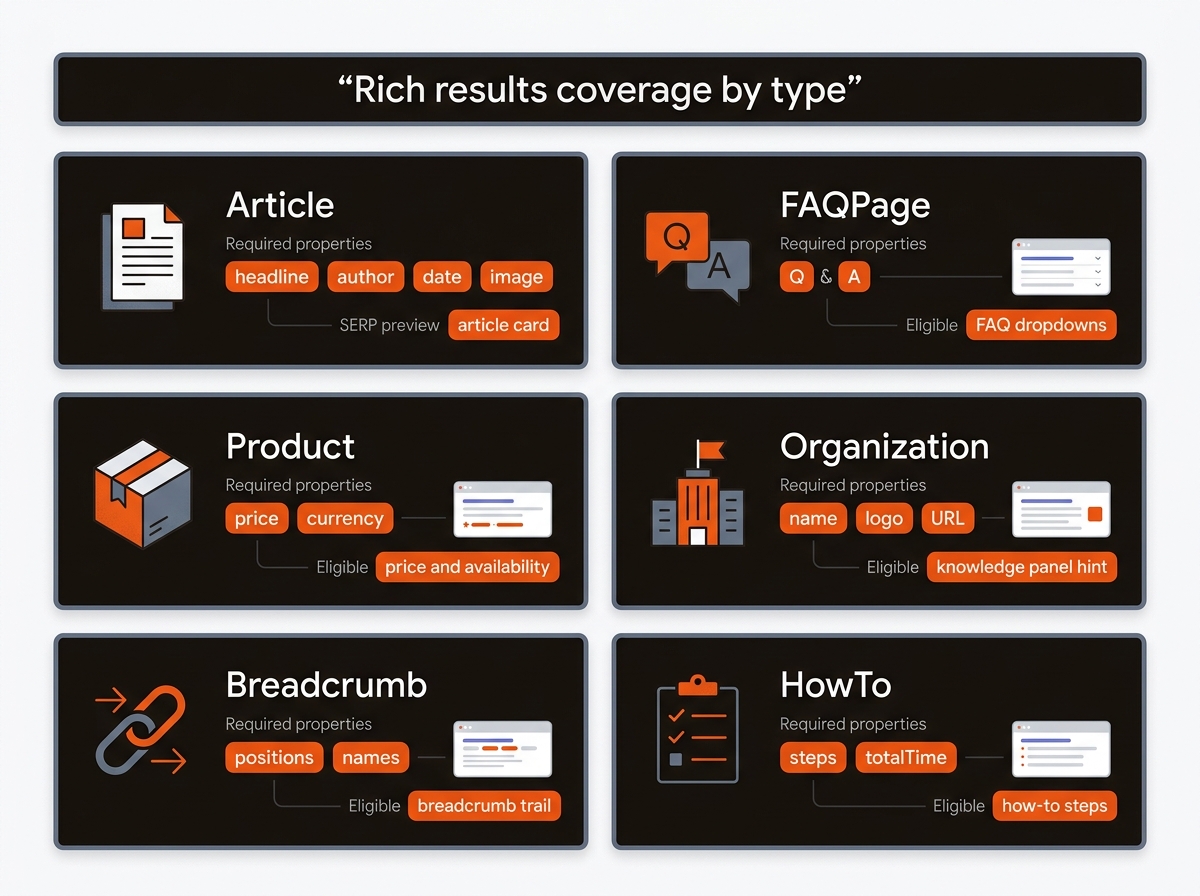
Comparison of Common Schema Types and What They Enable
Implementation notes:
• Add one script tag per page type. Keep values consistent with visible UI.
• Validate every deploy. Monitor enhancement reports and fix warnings quickly.
Operators need schema at the template level to scale across 100+ URLs. Map page types, templatize JSON-LD, bind to CMS fields, pre-publish validate, then auto-refresh when content changes. That is how you move from can you provide an example of schema markup to sitewide results.
Tradeoff: GTM is fast to test but can fire late, causing validation misses. CMS-baked templates require engineering time but produce consistent, crawlable markup that ranks.
Mergeflo provides an autonomous SEO + AEO content engine that drafts articles with FAQ schema and suggested internal links, and publishes what you approve to Webflow. It adds FAQ schema to the articles it publishes; Article and breadcrumb schema come from your own Webflow template, so templating, validating and monitoring that markup stays with your team. If you need help crafting markup, see our sibling playbook on How To Generate Schema Markup.
Start by inventorying every template and URL pattern, then map each to a schema type with a property checklist. Build one JSON-LD template per type with placeholders for headline, image, datePublished, dateModified, author, and mainEntityOfPage. Wire templates to CMS fields and enforce formats at save time, such as ISO 8601 dates and absolute URLs. Add CI checks that run a linter and a headless render to verify the script tag appears once per page. Ship a dashboard tracking coverage by template, error rates, rich result impressions, and deltas after deploys.
Both work for blog content. BlogPosting is a subtype of Article. Pick one and keep it consistent across templates. Include headline, datePublished, author, and image at minimum, and ensure they match visible elements. Consistency improves eligibility stability across crawls.
Place the script in the head or body of the rendered HTML. For scale, bind JSON-LD templates to CMS fields so each new post gets valid schema automatically. Avoid GTM for core content types because late tag firing can cause validation misses and unstable eligibility.
Only mark up Q&A that the user can see on the page. Use clear Question.name and Answer.text, and keep language identical to the UI. Do not inject FAQ on pages that are not FAQs. Overuse or mismatched content can result in ineligibility or manual actions.
Track enhancement counts and error resolutions in Search Console, then compare CTR by page group before and after implementation with annotations on deploy dates. For AI visibility, monitor citations in ChatGPT and Perplexity on target queries after schema and internal link updates to see extraction quality.
