
Short answer: To generate schema markup, pick the correct Schema.org type, build JSON-LD with required properties, add one script tag in the head, and map fields from the page. Validate with Google Rich Results Test and the Schema.org validator, then bake it into CMS templates so every matching page ships it consistently.
Before you generate anything, our main guide explains what schema markup is and how to validate and monitor it, and lists every schema guide we have.
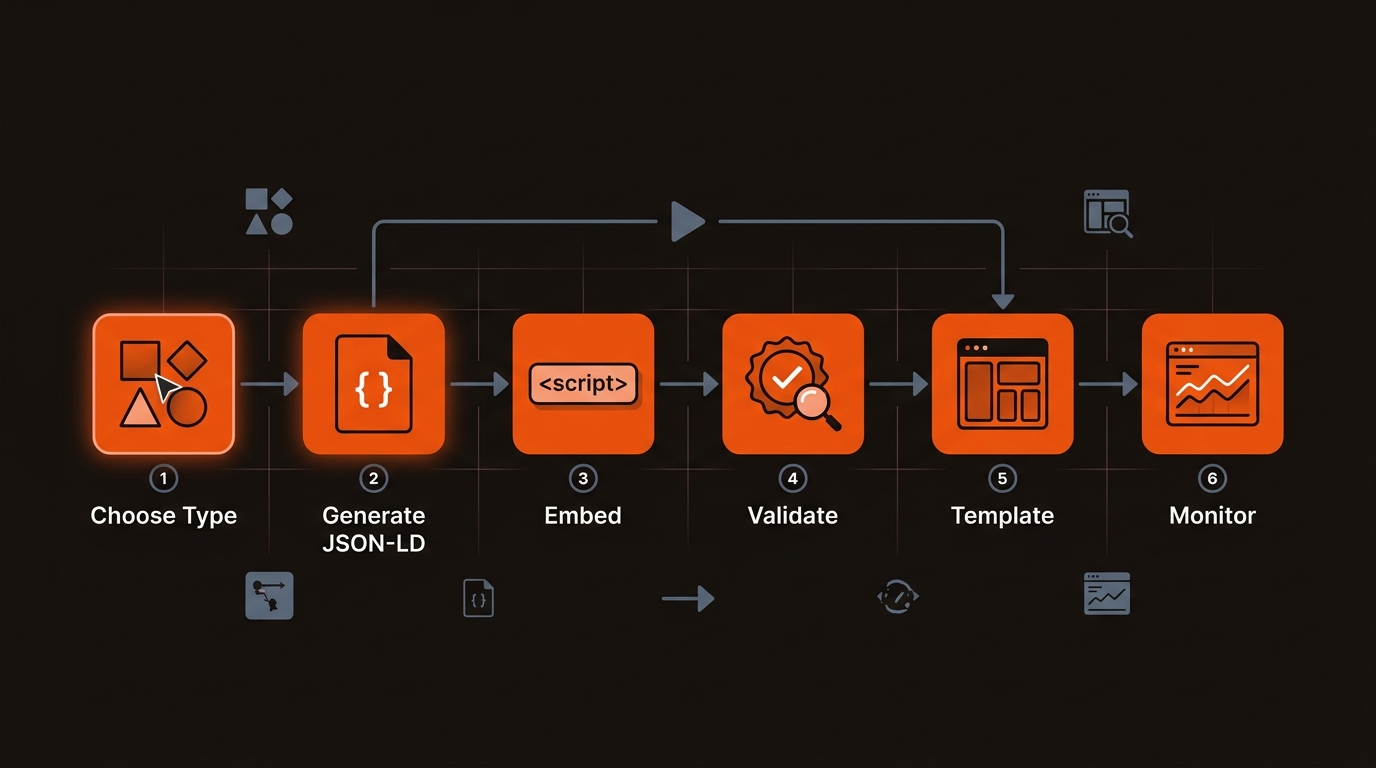
Most schema failures come from wrong type selection, missing required fields, and non-templated deployment. Operators mark up everything as Article, skip required fields like datePublished or image, and paste ad hoc scripts per post. That passes a one-off test but fails at scale. Use Schema.org to confirm required vs recommended properties and mirror visible content, not just metadata.
Structured data that conflicts with on-page content or repeats inconsistently is ignored. Treat schema as a template-bound content model.
Validation is ongoing. Use Google Rich Results Test and monitor Google Search Console Enhancements for error counts and coverage by type. Re-test after template or CMS changes to catch regressions. Reference: Schema.org and Google Rich Results Test.
Choose the type, write the JSON-LD, place one script block, test it, then move it into the template.
<script type="application/ld+json"> block. The head is the usual place; Google also reads it in the body.If a plugin or app already adds Article or Organization markup, turn that output off before you add your own, or the page ends up with two conflicting copies. To check, view the page source and count the JSON-LD blocks of each type.
For which format and types to use, see the main guide: what is schema markup.
Pick the method that balances control and scale for your CMS, team, and page volume.
Comparison of schema generation approaches for control, scale, and failure modes
Use a generator to prototype valid JSON-LD fast, then port the fields into a CMS template or component. For SPAs or headless, inject via a head component and ensure one script per page instance to avoid duplicates.
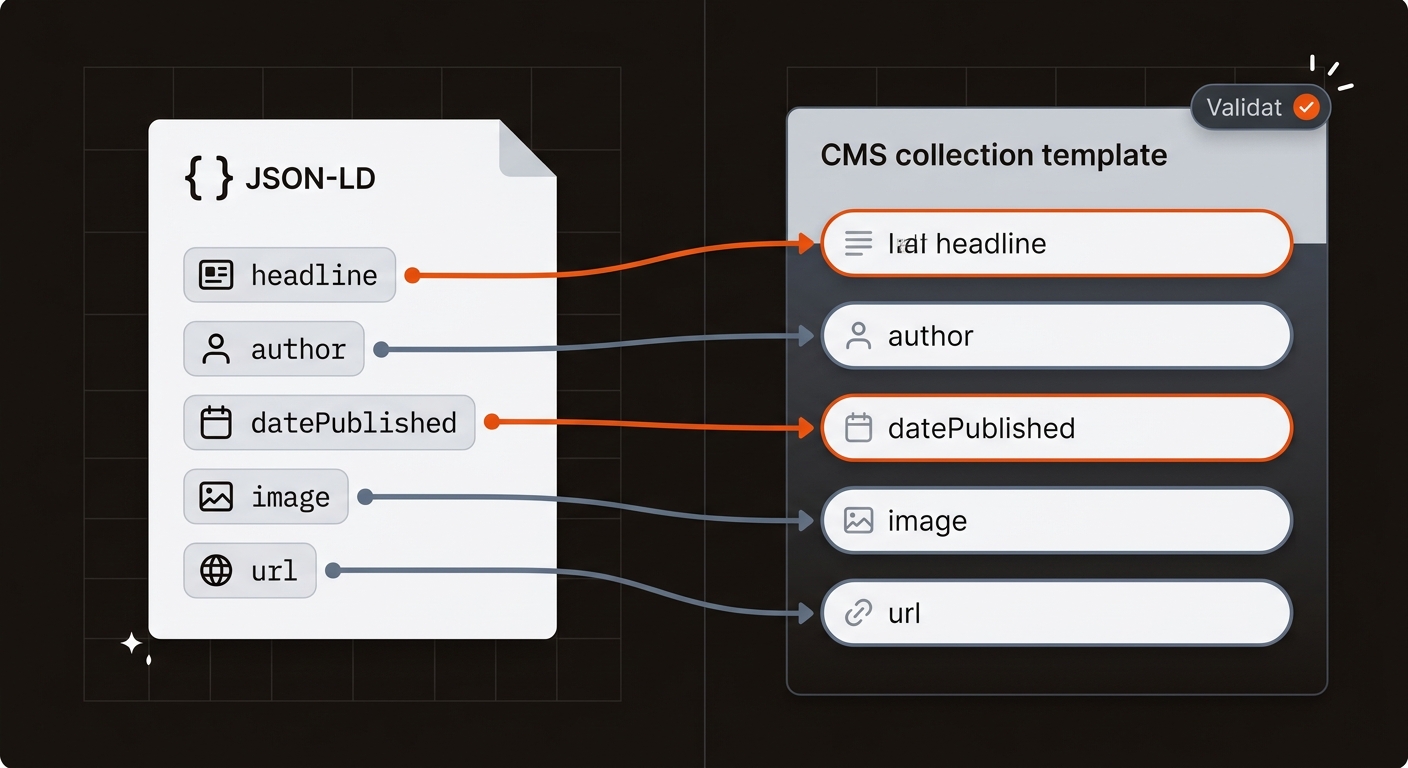
Tradeoff: plugins are fast to start but often collide with custom scripts, creating duplicate Article or Organization objects. A single source of truth in your template beats any plugin stack long term.
Schema stays correct when it ships with every publish, not as a one-off paste. Tie schema to your content model: Article or BlogPosting for posts, Product for pricing/features, HowTo for step-by-step docs. Keep one source of truth to avoid duplicate or conflicting markup. If discovery is weak, fix crawl and index gaps in parallel; structured data cannot compensate for blocked or thin pages. If you suspect crawl gaps, read why your site isn't indexed.
A Monday-morning plan for a lean team: in Webflow, add a JSON-LD component to the Blog collection template and map headline, image URL, author, and dates. In Next.js, add a Head element in the layout and pass props from MDX or CMS fields. Crawl with Screaming Frog to extract JSON-LD, filter by @type, and verify required fields across 100% of pages.
Moving from per-post paste to a template takes setup time up front, offset by no ongoing paste work and fewer production regressions.
Mergeflo adds FAQ schema to the articles it publishes. Autonomous SEO + AEO content engine: it finds gaps, drafts articles with FAQ schema and suggested internal links, and publishes the ones you approve to Webflow. Article, Product and Organization schema still come from your own templates, so validate and maintain them as content evolves.
Make schema decisions that ship fast, scale in your CMS, and do not create maintenance debt.
Use Article or BlogPosting for editorial content with author, datePublished, headline, and image. Use Product for feature or pricing pages; add offers only if price and availability are visible. Use HowTo only for step-by-step procedures with steps and images. Nest FAQPage only when the QAs are visible on the page.
Inject one script in the head via your layout or route component. In Next.js, use next/head; in Webflow, add custom code in the head for collection templates. Ensure client-side hydration does not duplicate scripts. Google Tag Manager can inject JSON-LD and Google documents that approach, but markup added after load is harder to test and easy to duplicate, so prefer the template.
Start with Google Rich Results Test on a representative set of pages. In production, watch Google Search Console Enhancements for error counts and coverage by type. Crawl with Screaming Frog to extract JSON-LD, verify required properties, and flag duplicates or missing fields across templates. Re-run after any template or plugin change.
Whenever the template or the data behind it changes. Add a schema test to your release checklist, review the Search Console rich result reports every week, and make sure prices and availability in the JSON-LD update when the page does.
Designate one source of truth. If you use a template script, disable auto-schema plugins to avoid duplicates, especially Organization and Article. Keep images and logos within Google guidelines, e.g., an Organization logo of at least 112x112 pixels (Google's Organization guidance). Sync headline, dates, and author to match visible content exactly to avoid conflicts.
