
Pair a tool's KD score with a manual SERP teardown of the top 10 results to find keyword difficulty. Check backlinks to ranking pages, domain authority, intent and content type, SERP features, and freshness. As a rule of thumb, if six or more results are high-authority sites with strong links, the keyword is hard for a new site.
Keyword difficulty is not a single number. Start with your tool's KD to get a link-cost ballpark, then validate against the top ten. Count referring domains to the ranking pages, note average domain strength, check how many results are non-commercial pages like forums or docs, and look for intent mismatch. Below you will find two real Google results pages and a scored example built on measured volume and KD. For the full keyword research process, see Profitable Keywords with Low Competition: the Mergeflo guide.
KD is only directional; the SERP decides your odds. Tool scores vary by methodology and miss format friction like video packs, forums, and branded moats. Use one KD source (Ahrefs or Semrush) for consistency, then run a 5-minute SERP audit to test link strength, intent fit, and clickability before you brief content.
A small team cannot chase every "easy" term. Prioritize cases where your page type matches intent, and at least four of the top results have modest link profiles. Validate inputs against sources like Semrush and SE Ranking. If you need how to find keyword difficulty fast, this is the repeatable workflow.
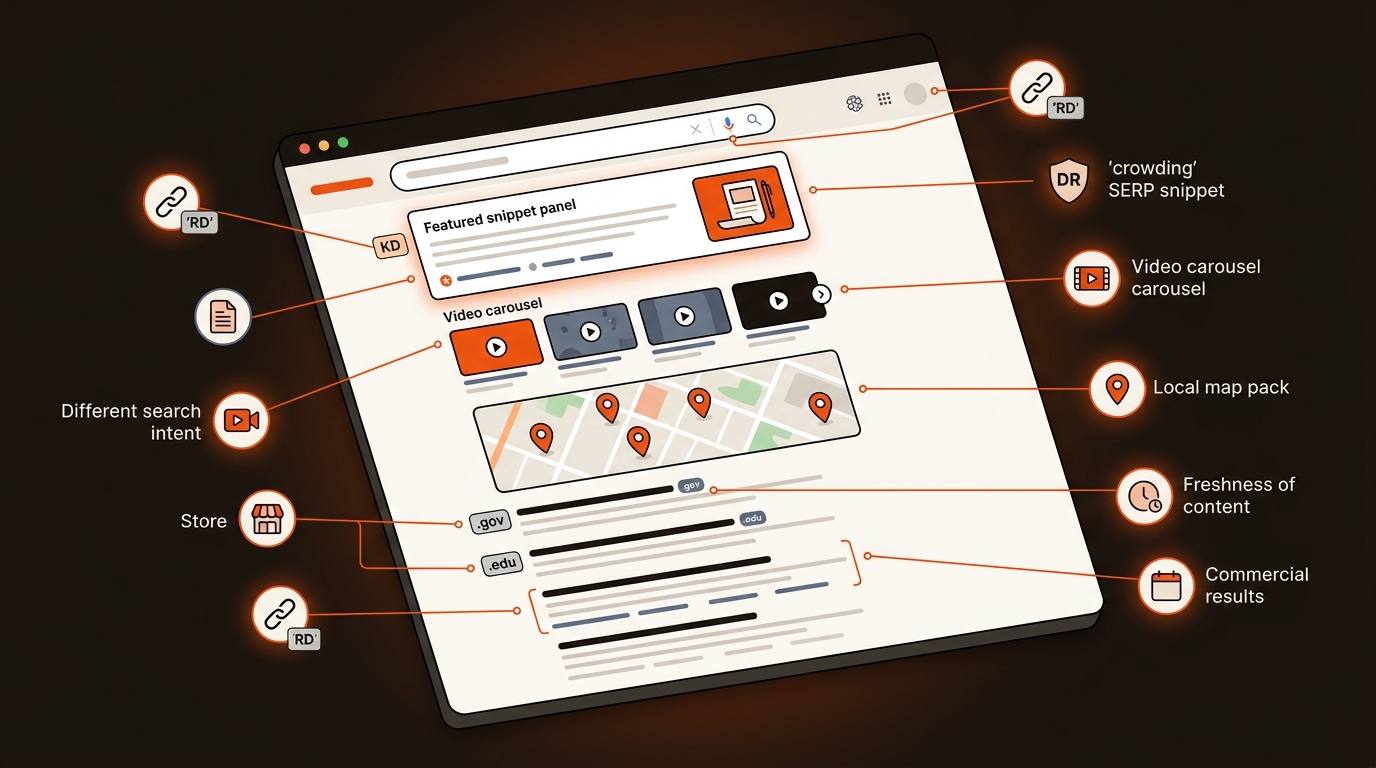
“We calculate keyword difficulty scores by analyzing the top 10 search results for any given keyword.” SE Ranking
KD usually models links to the top results, but it does not price brand bias, intent skew, or page types. Two keywords at KD 30 can diverge hard: one SERP is nine entrenched brands with comparison pages, one is six forum threads and a stale listicle. KD ignores freshness spikes where recency trumps links, and it misses topical authority where a niche site outranks stronger domains. It also compresses volatility and link velocity. If top pages add links weekly, your static KD understates effort. Without SERP context, you plan budgets against the wrong opponent.
Blend one KD score with six quick SERP checks to make a go/no-go call. This gives you an operational answer in minutes and keeps your pipeline moving without guesswork.
Checklist to validate keyword difficulty in minutes
These thresholds are starting points, not industry standards. Adjust them to your niche. If three or more checks fail, park the keyword or target a modifier. Tools like the Ahrefs KD Checker are fine for a first look; this checklist turns that score into a decision. Tradeoff: news-heavy or YMYL topics can shift quickly; recheck freshness and features before you ship.
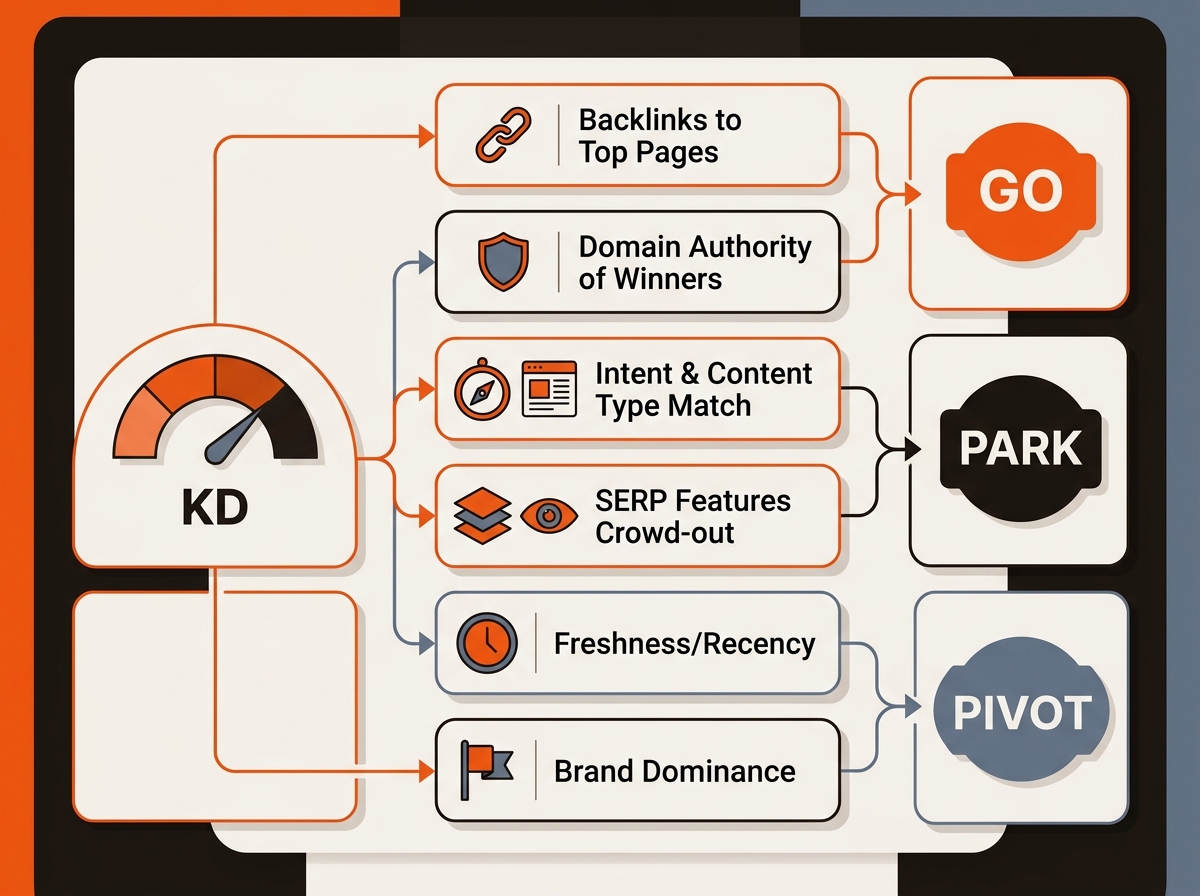
Minute 1: record KD, volume, CPC, and your site’s DR. Set a provisional link budget range using KD buckets, for example 0 to 10 low, 11 to 30 medium, 31 plus high. Minute 2 and 3: open results 1 to 10, log page type, title match, publication date, referring domains per page, and domain strength. Flag any page with fewer than 30 referring domains or obvious intent mismatch. Minute 4: scan SERP features, snippet, People Also Ask, ads count, and pixel depth to first organic. Minute 5: decide viability, score 1 to 5, and note next actions and outreach need.
A KD number says nothing about what sits on the page. These are two real Google results pages for keywords from our keyword workbook, captured on 2026-10-10 for the United States on desktop, signed out. Read them the way you would read your own.


One caution. The same two queries, pulled two days earlier with a different tool (Serper), returned different top 10s. For “seo automation” only eesel.ai appears in both lists, and for “ai search visibility tool” no domain appears in both. Result pages move and differ by tool and location, so date every teardown and check again before you brief.
We score each keyword from 1 to 5 on buyer intent, ICP match, rank feasibility, demand and category importance. The weighted score is 0.30 x Intent + 0.25 x ICP + 0.20 x Feasibility + 0.15 x Demand + 0.10 x Category, multiplied by 20 for a 0 to 100 score.
Measured: US monthly search volume and KD, from DataForSEO Labs (US, English), pulled 2026-10-08. Judgments, not measurements: the five 1-to-5 sub-scores, which come from our keyword workbook dated 2026-10-08. Treat them as our own call, and redo them for your product.
We pulled the top 10 for each keyword on 2026-10-08 (Google US, via Serper). Page types below are read from the titles, so they are judgments too.
What we did not measure: the referring-domain gap to those pages. Feasibility depends on it, so pull it from Ahrefs or Semrush before you brief.
The queue reads: “seo automation” (86) first, “ai search visibility tool” (82) second, “ai gtm” (64) third. The gap between KD 36 and KD 14 cost only 4 points: the harder keyword got a feasibility score one point lower, and feasibility carries 20 percent of the weight while intent, ICP and category carry 65 percent. High KD alone does not disqualify a keyword your buyers care about. An easier keyword with weak intent falls fast: “ai gtm” has KD 18 but an intent score of 2 and a demand score of 2, so it lands at 64.
Your goal is not a perfect score; it is a fast, consistent go/no-go pipeline. Standardize the checklist, tag outcomes (go/park/pivot), and push winners into briefs with internal links and schema upfront. Mergeflo goes past tracking: it finds gaps, drafts articles for your review, and publishes the ones you approve to Webflow. Use this KD+SERP workflow to choose targets and seed clusters; Mergeflo then drafts the articles with FAQ schema and suggested internal links, and a person approves each one before it publishes. For selecting targets that also read well, pair this with our SEO-friendly keywords guide to balance readability and rankability in briefs.
Turn teardown outputs into lanes. Tag keywords as green, yellow, red using your 1 to 5 viability score, expected link budget, and content type. Green means brief this week and internal link from three topically close pages. Yellow requires a light link plan, for example five prospects and two anchors. Red goes to backlog with a prerequisite of cluster build or partner links. Roll up weekly capacity and tie it to sprint goals. Track cycle time, first ranking date, and links earned to refine thresholds each month.
Use the SERP. Pull the median referring domains (RD) of the top 5 pages from Ahrefs or Semrush. If the median is 20 RD, plan for a link profile of similar size, built through page-level links plus internal links across a small cluster. Calibrate by niche volatility.
Target a modifier or wedge angle first (for startups, template, calculator). Publish a small micro-cluster, earn internal authority, then revisit the head term. High intent with a narrow angle can be more reachable than forcing the head term. The worked example above shows why a high KD does not end the discussion: “ai search visibility tool” has a KD of 36 and still scored 82 out of 100.
No. KD is built around Google's results, not AI answers. For AI tools, keep a fixed list of buyer questions and record whether your brand is mentioned, cited or recommended, as separate results (see how your business shows up in AI searches). On paid plans, Mergeflo checks this every week for ChatGPT, Gemini and Claude, alongside your Google positions.
Ignore KD for branded terms, feature docs, and bottom-funnel queries where conversion value is high. Also ignore it during newsjacking windows where freshness dominates. In all other cases, run the 5-minute checklist to avoid wasting sprints and to keep decisions consistent across the team.
Use both. A KD score is a quick estimate of link cost, and each tool calculates it differently, so do not compare scores from different tools as if they were the same scale. The SERP shows the page types, features and dates that the score leaves out.
Search the exact keyword in a private window, set the country you sell in (for the US, add gl=us to the Google URL), and take a screenshot of the top results. Write down the date, the location and whether you were signed in, and keep that note with the image. For the screenshots on this page we used DataForSEO's SERP screenshot API, because Google showed a captcha to a plain automated browser.
