
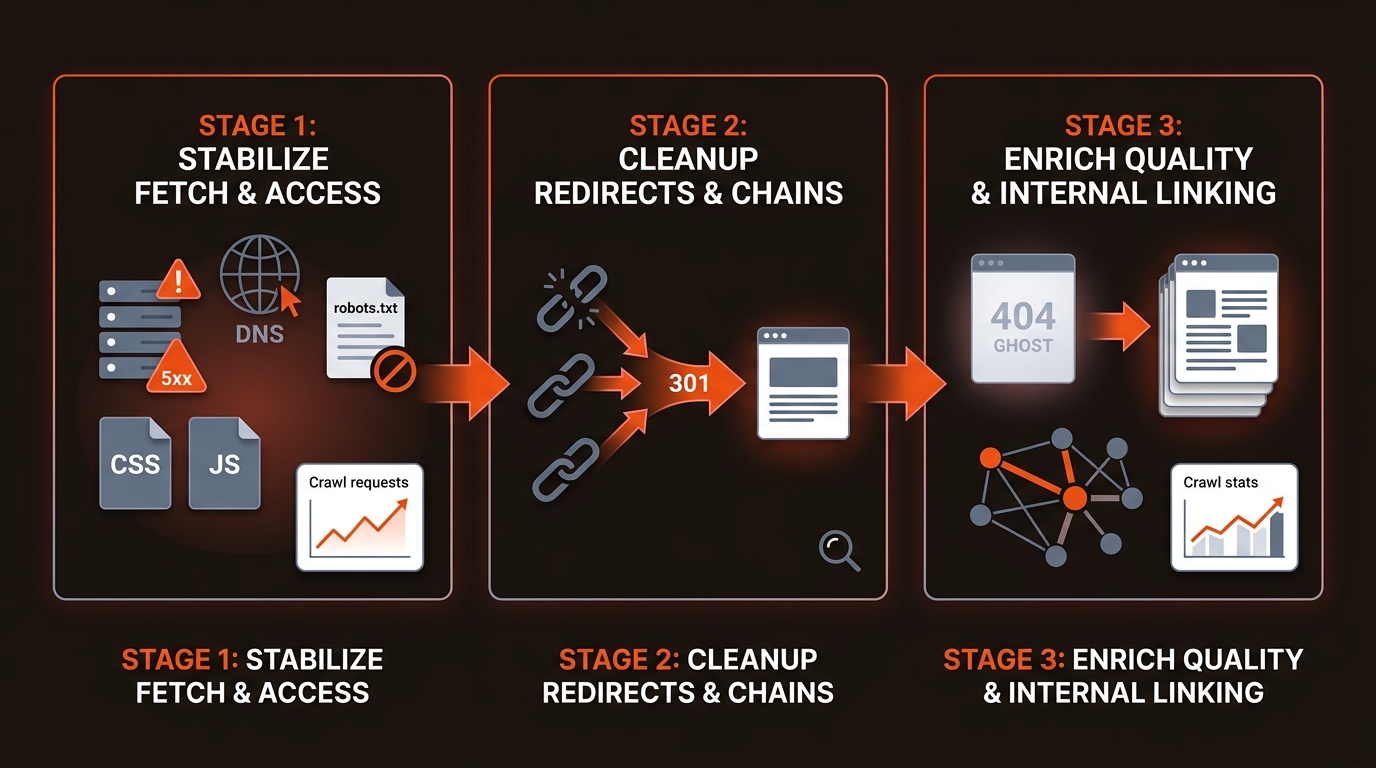
Short answer: To fix crawl errors in Google Search Console, stabilize fetch failures first (DNS, 5xx, robots), then clean redirects, then address soft 404 and quality/internal links. Validate sample URLs with URL Inspection (live test + headers), ship fixes, resubmit sitemaps or run Validate Fix, then watch Crawl stats for recovery.
If your URL shows a different status, our troubleshooting hub for pages not indexed in Search Console maps every status to the guide that fixes it.
Fix crawl errors by ranking them by impact on indexation and revenue, then closing root causes quickly. Start in Search Console: Indexing > Pages and Settings > Crawl stats. Export errors, group by status and URL pattern, and hit the biggest buckets first: DNS or server 5xx, robots.txt fetch failure, redirect loops, and 404 on submitted URLs. Reproduce with URL Inspection and curl -I, fix the configuration, redeploy, then Validate Fix. Watch Crawl stats for response code mix and average response time. Our suggested timebox, not a standard: 60 minutes to halt systemic issues, 24 hours for high volume patterns, 7 days to clean long tail.
Stabilize fetch failures before content cleanup; they throttle Googlebot. Fix DNS/5xx outages, robots.txt fetch issues, and blocked critical resources first. These reduce crawl requests and delay indexation across templates. Only after the fetch layer is stable should you collapse redirect chains and resolve soft 404 or Crawled - currently not indexed states.
A small B2B SaaS team cannot out-publish a 5xx spike. Use URL Inspection for live fetch and rendered HTML. Check origin and CDN logs for 5xx bursts. Run Screaming Frog to surface redirect chains and noindex mismatches. Keep render-critical CSS/JS crawlable so Google sees the same HTML your users do.
External reference: Crawl stats report
Treat platform-wide failures first. If URL Inspection returns DNS unavailable or Crawl stats shows host status degraded, check DNS, TLS, and CDN health, then origin availability. Next, tackle spikes in 5xx. If a noticeable share of crawls return 5xx, pull logs, identify endpoints with highest error counts, and ship a rollback or capacity increase. Then confirm robots.txt is reachable and correct. Fetch robots.txt and review Disallow lines for critical paths. Finally, unwind redirect errors and loops. Keep to a single 301 hop and verify the final URL returns 200 with the intended canonical.
Triage by impact: sitewide fetch - redirect integrity - content quality. Use this map to ship fixes this week. Aim for single-hop 301s, consistent canonicals, and sitemaps that only list indexable URLs when you fix crawl errors in Google Search Console.
Reference: Google on 404s not harming performance: Search Central
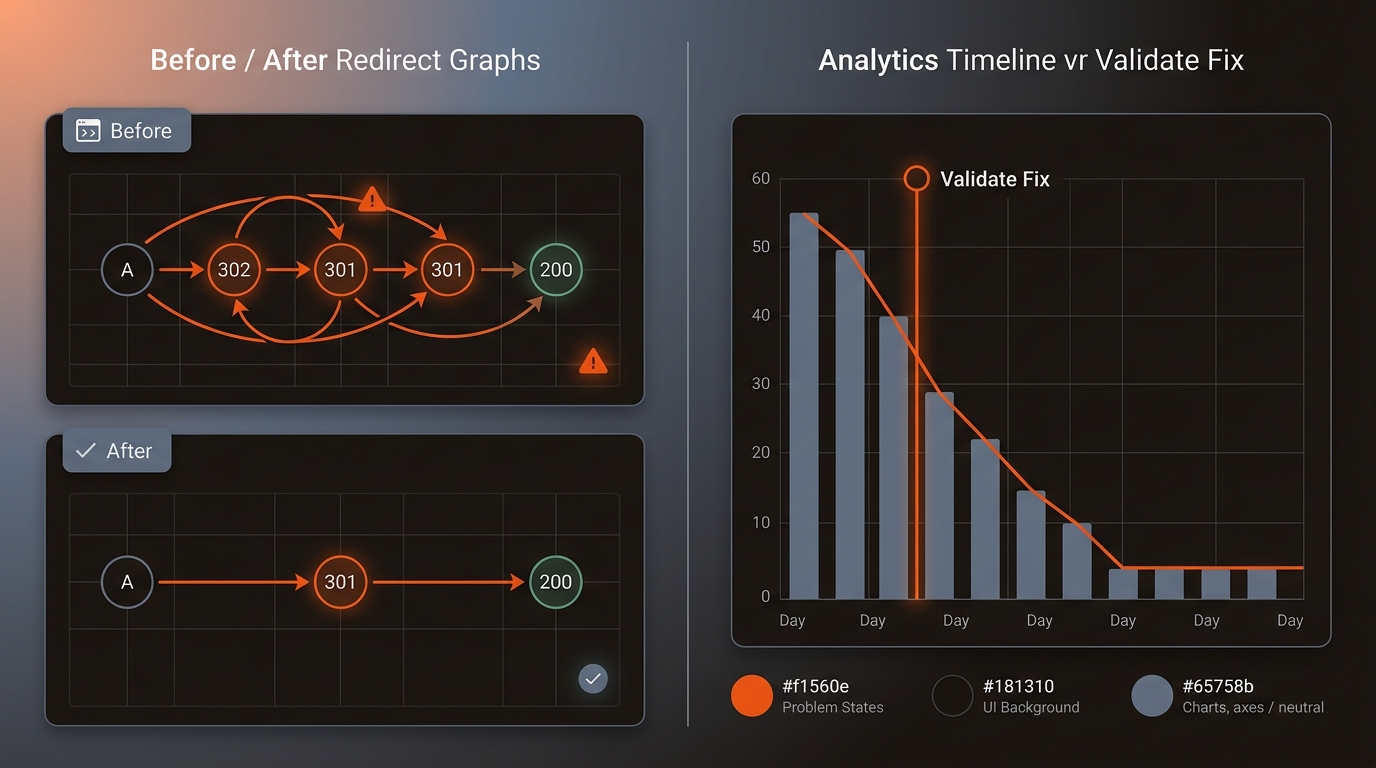
Server error 5xx: fix app errors, raise limits, warm caches, and serve 503 with Retry-After during maintenance to signal temporary unavailability. Redirect error: remove chains and 302s leftover from campaigns, collapse to a single 301, and ensure the target is not blocked or noindexed. Not found 404: for permanently removed items use 410; for replaced items 301 to the closest relevant page; update internal links and sitemaps so Google discovers the correction fast. Soft 404: add unique content and structured data, or change to 404 when the page truly has no value.
You need a repeatable process that flags, fixes and validates crawl errors. Mergeflo is an AI search visibility platform for startups. It tracks your Google positions and, on paid plans, checks whether ChatGPT, Gemini and Claude mention your brand. It drafts articles for your review; the crawl fixes above stay with your team.
Our autonomous SEO + AEO content engine finds gaps, drafts articles with FAQ schema and suggested internal links, and publishes the ones you approve to Webflow. Canonicals, sitemaps and redirects stay in your own stack. For persistent exclusions, see our take on How To Fix Discovered Currently Not Indexed In Google Search Console.
Codify the loop. Create playbooks for each error class with sample log lines, reproduction steps, and rollback rules. Pull Search Console data daily via API, join with server logs, and trigger alerts when thresholds breach, for example when the 5xx rate stays above a level you set or new redirect error patterns appear. In CI, fail builds that introduce 404s in a core path. Before launches, run a canary crawl of your top URLs, validate headers and robots, and ship only when pass rates meet your SLO.
No. Google treats 404s as normal; they do not harm performance unless you are linking to them internally or they replace important content. Keep 404 for intentionally removed URLs. Add 301s only when there is a clear successor or the URL has valuable external links you want to preserve.
Use noindex for pages you want de-indexed but still crawlable. Use robots.txt to prevent crawling of non-indexable utility paths (for example, faceted parameters) that do not need evaluation. Use the Removals tool for urgent temporary removals, then set 410/301 or noindex for permanence. The tradeoff: robots blocking prevents Google from seeing your noindex.
Crawl the site with Screaming Frog or Sitebulb, export redirect chains, and collapse to one 301 hop. Spot-check headers with curl or URL Inspection. Align rel=canonical, sitemap target URLs, and internal links to the final destination to avoid mixed signals and wasted crawl on intermediate hops.
Google recrawls on its own schedule, so check the Crawl stats report in Search Console after the fix to see when the errors stop. Redirect and soft 404 cleanups take longer to fully reflect, because Google has to recrawl each URL. Watch the Crawl stats report’s total requests and average response time. Run Validate Fix on affected patterns to accelerate confirmation when you fix crawl errors in Google Search Console.
