
Short answer: Your page is not indexed because Google cannot crawl it, is told not to index it, or chose a different canonical. Check robots.txt, meta robots or X-Robots-Tag, HTTP status, and canonical tags in URL Inspection. If those are clean, add contextual internal links and merge duplicates so the page has a clearer case for indexing. Google does not promise to index every page.
This page is our troubleshooting hub for pages Google has not indexed. Find the status Search Console shows for your URL in the table below, read what it means, then open the guide that fixes it. The rest of this page covers the checks that apply to every status: crawl access, noindex, canonicals, rendering and server health.
Open the Page indexing report or inspect the URL, find the reason Google gives, then use the guide for it. The meanings below follow Google's Page indexing report help.
Most "not indexed" cases are signal conflicts or low-importance pages. Teams ship thin or near-duplicate pages, bury them two clicks deep, add a self-referential canonical, then expect quick indexing. Google triages crawl budget. Your URL loses when it looks weak or redundant.
Small teams with tight content budgets feel this hardest. If several new pages are thin variants of each other and none is linked from a hub page, they tend to stall. The tradeoff: ship volume for coverage, or slow down so each URL has unique value, a correct canonical and a few strong internal links. The second path gives Google a clearer reason to index each page.

Read the exact GSC status, run targeted checks, then apply the minimal fix that boosts index-worthiness. Use URL Inspection to confirm live HTTP response, robots directives, and Google-selected canonical. Validate with Screaming Frog and server logs to confirm crawl hits and duplication at scale.
Reference: Google's guide to blocking indexing with noindex says a page must not be blocked by robots.txt for the noindex rule to be seen, and its Page indexing report help defines each status in this table.
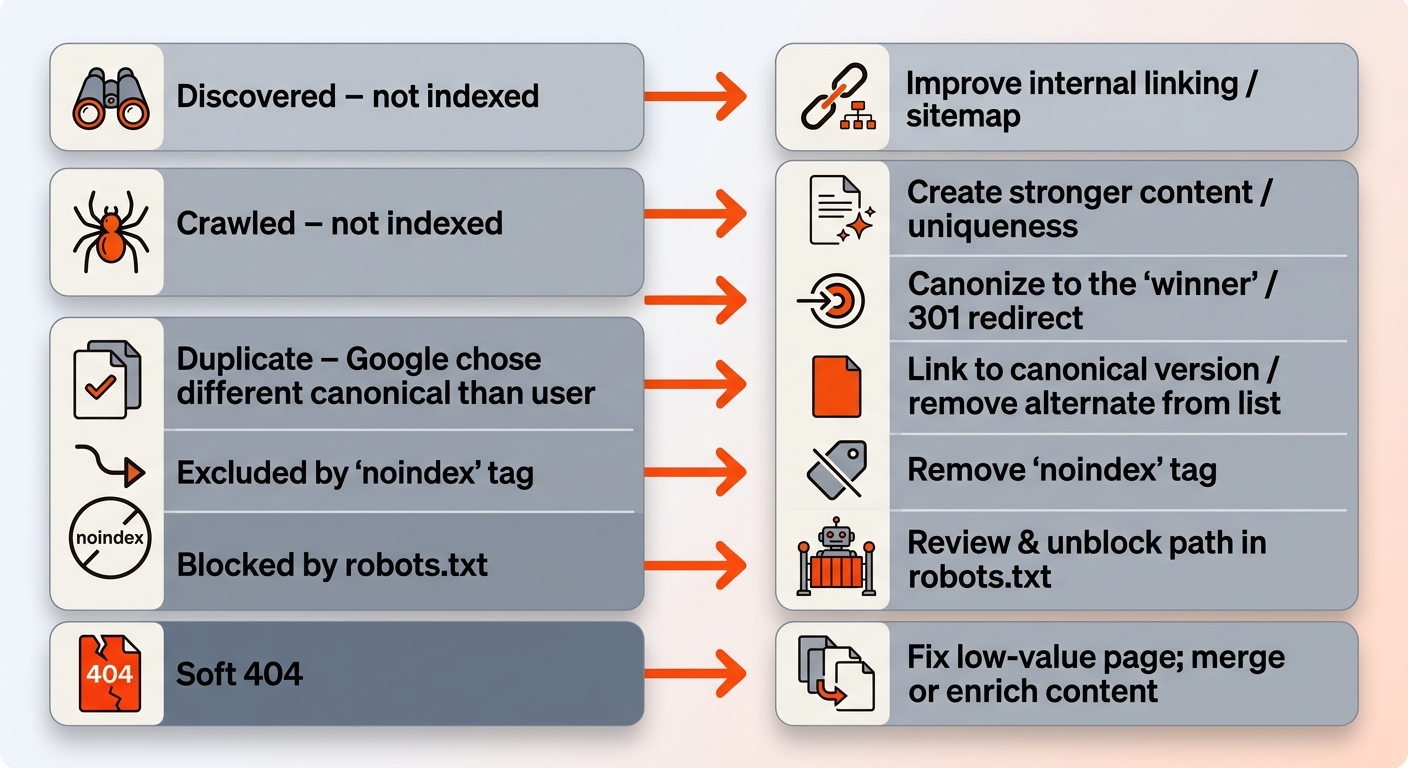
Not every excluded URL deserves a fix. Google does not index everything it processes, and tag archives, filter combinations and tracking-parameter URLs are often better left out. Start with URLs that already earn impressions, and correct their template before editing single pages so the defect does not return.
When directives and canonicals look clean but a page still stalls, check what Google actually receives. Run the live test in URL Inspection and compare View Source with the rendered HTML. If the main copy and links only appear after JavaScript runs, Google may crawl the page and still skip it, so serve primary content in the initial HTML or prerender the templates that stall.
Slow responses and server errors also reduce how often Google crawls, so check Crawl Stats and your logs before rewriting content. On a young site, some exclusions are normal; crawled but not indexed on a new site covers that case.
Bake indexing checks into your publishing pipeline so pages ship index-ready. Gate publishing behind a preflight: 200 status, canonical self-reference matches URL, no noindex, robots allowed, in XML sitemap, two or more contextual internal links from relevant hubs, and unique intro/body with clear intent match. If any fail, the page waits.
If you are asking "why is my Google Search Console page not indexed," treat it as a pipeline defect. Add a step in your CMS that blocks publish until URL Inspection returns crawlable and canonical-consistent. For near-duplicates, 301 to the best URL and retarget internal anchors. For faceted or parameter pages, canonicalize to the clean version and block parameterized variants from generation.
The tradeoff is speed vs quality. Publishing many thin cluster pages at once can leave them sitting in "Discovered" for a long time. Publishing fewer pages with unique value, tight canonicals, and hub links gives Google a clearer reason to index each one.
Keep the sitemap clean as well. List only canonical, indexable URLs that return 200, and remove soft 404s, redirected URLs, faceted pages and tracking-parameter variants. Each week, compare the Indexed count in the Page indexing report with the pages your CMS shows as published, since a widening gap points to a discovery or selection problem.
Mergeflo supports the content side of this workflow. It finds search gaps and buyer questions, drafts briefs and articles in your brand voice for review, publishes approved articles to Webflow, and flags pages losing impressions, then writes a refresh brief when you press Refresh. Canonicals, sitemaps and rendering stay in your own stack, so keep them in the preflight above. If you are tuning link attributes at scale, this note on nofollow usage and crawl flow adds context for distributed linking.
Fix crawl and canonical issues first; indexing requests help only after the signals are right.
There is no fixed wait. Google says crawling can take from a few days to a few weeks, and that requesting a crawl does not guarantee the page will be indexed. Use Request Indexing for important URLs after you have fixed crawl access, canonicals and internal links. Requesting the same URL again will not get it crawled faster.
Google may override if content is near-duplicate, the canonical is slower or weaker, or internal links favor another URL. Make the chosen canonical the strongest: consolidate duplicates with 301s, align anchors to the target, and confirm identical canonical tags across variants.
Use noindex for exclusion. Robots.txt blocks crawling and can prevent Google from seeing your noindex directive. Allow crawling and apply meta robots noindex or X-Robots-Tag. See Google's guidance on crawl vs index controls in Search Central.
No. Indexing is admission; ranking is placement. Many pages get indexed but never reach page one because they lack intent fit, depth, links, or topical authority. After indexing, track impressions and CTR in GSC and upgrade content or internal links to move positions.
No. A sitemap helps Google discover a URL, but it does not set priority or override weak signals. The page still needs contextual internal links, a non-conflicting canonical, and content that satisfies the query. Keep lastmod accurate and resubmit only after meaningful changes.
Google documents the Indexing API for job posting and livestream pages only, so it is not a supported shortcut for ordinary content. Outside indexing services do not change the signals Google evaluates. Fix crawl access, canonicals, internal links and rendering first, then use Request Indexing for the pages that matter.
