
Short answer: The three Core Web Vitals are Largest Contentful Paint (LCP), Interaction to Next Paint (INP) and Cumulative Layout Shift (CLS). A “good” experience means LCP within 2.5 seconds, INP of 200 milliseconds or less, and CLS of 0.1 or less, measured at the 75th percentile of real visits. Search Console's Core Web Vitals report shows this field data for the last 28 days.
This is our main Core Web Vitals guide: the thresholds, what usually fixes each metric, and how to measure. Our other guides go deeper on single questions, such as how to test a site step by step or how to pass a failed assessment; they are all listed under “All our Core Web Vitals guides” further down.

INP replaced First Input Delay (FID) as a Core Web Vital on March 12, 2024; INP measures all interactions, not just the first. Field data covers a rolling 28 days, so ship fixes across templates to move the 75th percentile for the whole site.
Google rates each metric at the 75th percentile of real visits, separately for mobile and desktop. A page passes when all three are in the Good range.
Source: web.dev pages for LCP, INP and CLS.
Field data and lab data answer different questions. Field data (Search Console, the Chrome UX Report, the top of PageSpeed Insights) is what Google uses and covers the last 28 days of real visits. Lab data (Lighthouse) runs one simulated load, so it helps you find the cause but can disagree with the field numbers. INP needs real interactions, so lab tools show Total Blocking Time as a stand-in.
These are not Core Web Vitals themselves, but they explain why one fails.
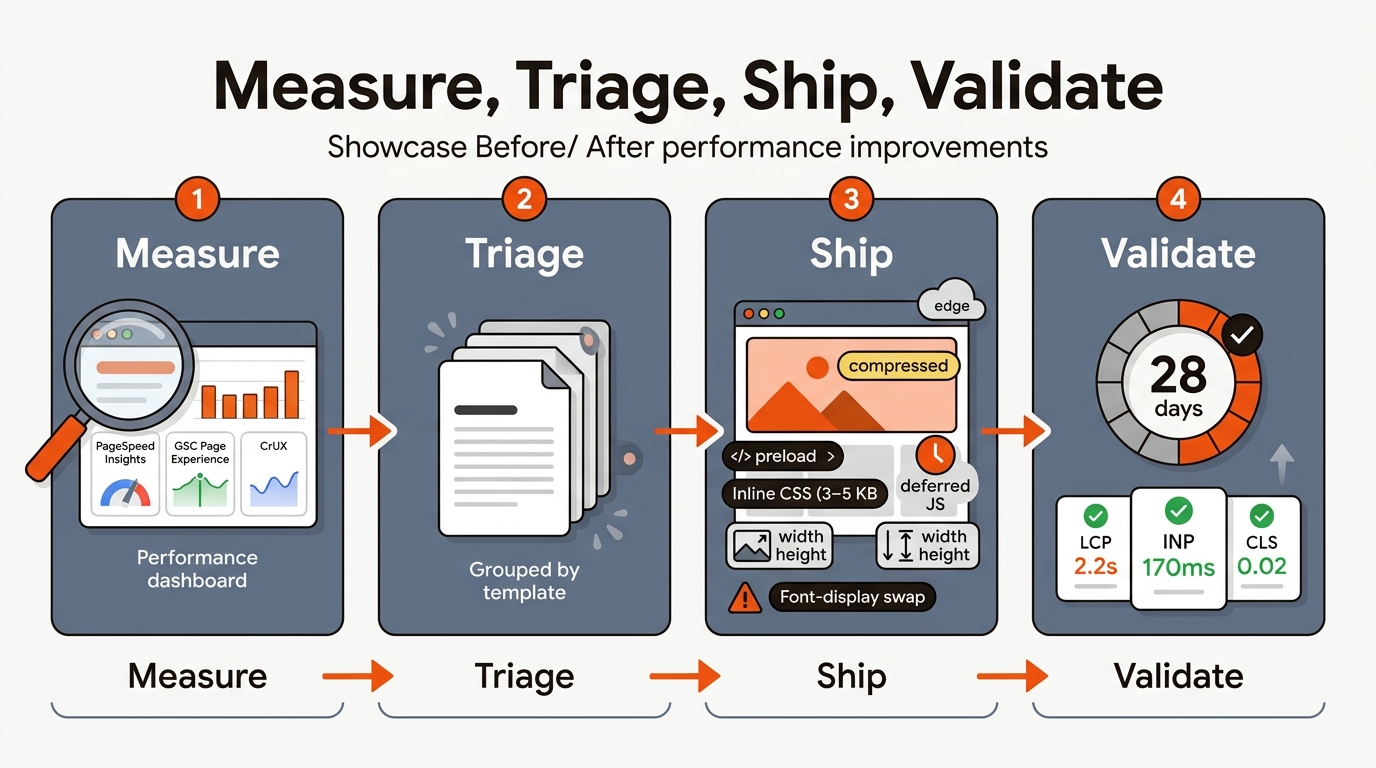
Triage by template and start with three common causes: hero image weight, render-blocking CSS and JavaScript, and layout shifts above the fold. These are the usual first suspects for LCP, INP and CLS misses on blogs and docs, so check them first.
Comparison: High‑Impact Fixes vs. Core Web Vitals
For deeper context, see Why Is My Website Not Indexed By Google.
Fix LCP first on your top templates; its causes are usually the easiest to find. Target the largest above-the-fold element.
• LCP: Convert hero to AVIF/WebP, set explicit width/height, add fetchpriority=high and preload the image or font. Inline critical CSS; defer the rest to kill render blocking.
• INP: Audit scripts with Lighthouse Treemap. Defer/async all non‑essential, remove unused tags, and split long tasks over 50ms. Prefer CSS for simple UI effects.
• CLS: Set aspect-ratio on images/video, reserve ad/widget slots, use font-display: swap, and avoid inserting DOM above existing content.
A small team scenario: Most of your posts use one blog template. Start by recording LCP, INP and CLS for that template in PageSpeed Insights. Swap hero JPEGs to AVIF, inline the critical CSS, defer non-essential tags, and add aspect-ratio to reserve space. Then watch the share of blog URLs rated “Good” in the Core Web Vitals report in Search Console.
Tradeoff to manage: Aggressively deferring analytics can break attribution windows, and inlining too much CSS bloats HTML. Set a script budget for each template and enforce it in CI with Lighthouse CI or WebPageTest API to keep marketing and engineering aligned.
Use lab for diagnosis and field for truth, then ship by template. PageSpeed Insights gives both lab and CrUX field data per URL. GSC’s Core Web Vitals groups URLs by similar issues so you can prioritize the template behind the largest “Needs Improvement” group.
• PageSpeed Insights + Lighthouse: identify the LCP element, blocking resources, long tasks, and layout shifts.
• CrUX (field): confirms if your audience, on real devices/networks, meets thresholds.
• GSC Core Web Vitals: choose the biggest failing URL group and fix its layout at the theme level.
Google says Core Web Vitals are used by its ranking systems, but good scores do not guarantee top rankings. Its page experience guidance adds that Google Search always seeks to show the most relevant content, even when page experience is sub-par, and that chasing a perfect score just for SEO may not be the best use of your time. Treat Core Web Vitals as hygiene: fix pages that fail the thresholds, then put most of your effort into content.
You need answer-first pages, reviewed before they ship. Mergeflo is an AI search visibility platform for startups. It tracks your Google clicks and positions and, on paid plans, checks whether ChatGPT, Gemini and Claude mention your brand, then drafts content for the gaps it finds. Autonomous SEO + AEO content engine: it finds gaps, drafts articles with FAQ schema and suggested internal links, and publishes the ones you approve to Webflow. Mergeflo does not measure or fix Core Web Vitals, so keep using PageSpeed Insights and Search Console for that work.
The thresholds and supporting metrics are on this page. Each guide below answers one question in more depth.
Google made INP a Core Web Vital in March 2024, replacing FID. INP measures the latency of all interactions during a page visit, not just the first input. The “good” threshold is 200 milliseconds or less at the 75th percentile of real visits. Expect more JavaScript and long tasks to surface in audits compared to FID-era reports.
Search Console's Core Web Vitals report uses real-user data from the last 28 days, so it moves gradually after a fix and reflects it fully only once 28 days of new visits are counted. If your traffic is low, it can take longer to reach the sample size needed. Check the fix right away in Lighthouse or PageSpeed Insights, then watch Search Console for the field data to follow.
Google says Core Web Vitals are used by its ranking systems, but good scores do not guarantee top rankings, and the most relevant content can still rank when page experience is weak. Fix pages that fail the thresholds, then spend most of your effort on content.
Run PageSpeed Insights on top traffic templates, Lighthouse CI on PRs to enforce budgets, and check GSC’s Core Web Vitals and Page Indexing reports every Monday. For deeper traces, use WebPageTest (filmstrip, CPU throttling) and Chrome DevTools Performance panel to split long tasks and validate INP improvements.
